Explore null | Canon Latin America
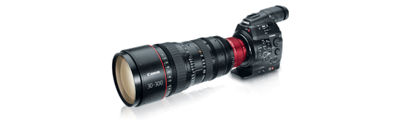
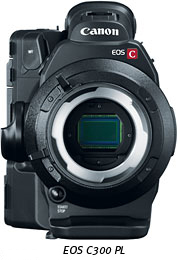
EOS C300 PL
- PL-mount camera fully compatible with virtually any PL-mount lens
- Super 35mm Canon CMOS Sensor and DIGIC DV III Image Processor
- Designed to meet the needs of demanding cinema industry professionals
- Compatibility with third-party accessories to meet virtually any production need
- EOS C300 PL Body (with Grip/Camera cover R-F-3)
- Monitor unit
- Handle unit
- Battery Pack BP-955 (also available as optional accessory)
- Battery Charger CG-940
- Compact Power Adapter CA-940 (also available as optional accessory)
- Eye Cup
- Viewfinder Cap
- Thumb rest
- Tripod base TB-1
- WFT Attachment
- Measuring Hook
- AC Cable x2
- DC Cable (for CA-940)
- Shoulder Strap SS-1200
- XF Utilities Disc Ver. 3.0
Leave No Story Untold.
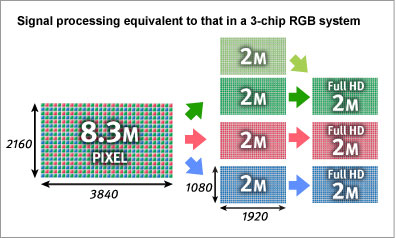
Modeled on the Super 35mm 3-perf motion picture film standard, the Canon CMOS sensor has an active image size of 24.4 x 13.5mm. It uses 3840 (H) x 2160 (V) photosites to perform the crucial optoelectronic transformation of digital imaging. Each photosite is a generous 6.4 x 6.4 micrometers in area and each has a microlens that ensures the highest efficiency in light transfer to the individual photodiode. Proprietary technologies within the photosite simultaneously lower the image sensor noise floor while enhancing the photon capacity of the photodiode - a combination that assures superb dynamic range. The image sensor employs an innovative readout technique that delivers full bandwidth individual RGB video components without the need for any debayering algorithms. Each of these components has a 1920 (H) x 1080 (V) sampling structure at up to 60 frames. From these original video components, a 1080-line 60i format or a 1280 (H) x 720 (V) at 60P HD format are selectively derived.
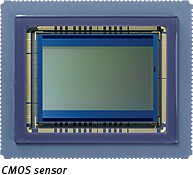
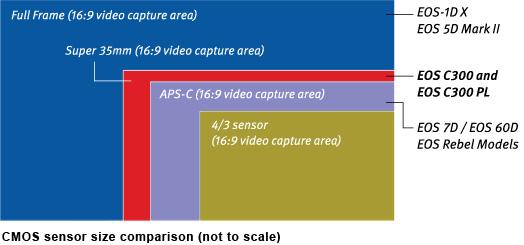
The EOS C300 PL incorporates the first Canon CMOS sensor designed specifically for high frame rate motion pictures, offering not only high resolution and shallow depth-of-field but also high sensitivity with low noise. Working together, Canon's Super 35mm sensor and DIGIC DV III Image Processor achieve a remarkably high signal-to-noise ratio that enables recordings with great detail and dynamic range even in minimal light.
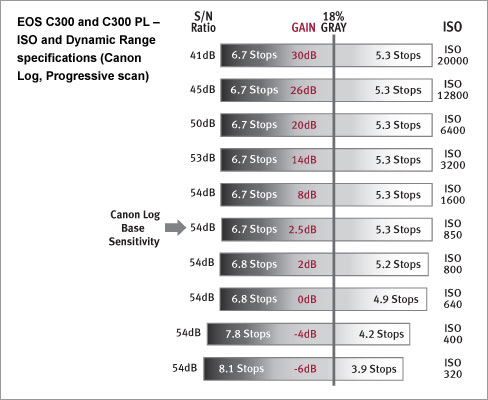
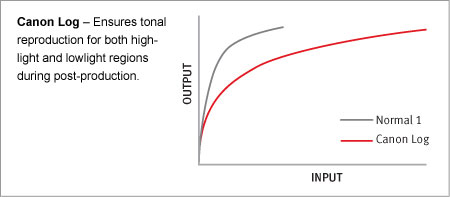
Shooting in Canon Log mode, cinematographers can set the camera exposure value using their customary light meter practices. Canon Log is a special nonlinear transfer function embodied within the DIGIC DV III RGB video processing system. This transfer function is specifically designed to facilitate the post-production of digital images originating in Cinema EOS in a manner similar to the post-production of images digitally transferred from motion picture film (the contemporary DI process). By managing the disposition of quantization bits, Canon Log ensures excellent tonal reproduction within both highlight and low-light regions of a given digital image - maintaining a total dynamic range of 800%. These sophisticated video grading processes restructure a new digital representation achieving a sought-after creative look on a quality reference display.
A dark and stormy night? With the EOS C300 PL, it's no problem. The combination of sensor and image processor render an extraordinary signal-to-noise ratio and as such make shooting at high ISO (up to ISO 16000) a breeze.
Reduced Rolling Shutter and Moiré ArtifactingThe EOS C300 PL uses enhanced signal processing to minimize rolling shutter skews and to reduce moiré artifacts. A high-speed readout significantly reduces the subjective visibility of the vertical skewing on fast-moving horizontal subjects, a typical pitfall of the CMOS image sensor neutralized by Canon technology.
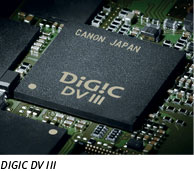
Designed and built by Canon for the highest HD RGB processing, the DIGIC DV III Image Processor uses proprietary circuits and architecture to deliver the highest image quality at the highest speeds, with low power consumption and minimal heat output. It processes the RGB representations originated in the single CMOS sensor of the camera into three channels (Red, Blue and Green) to maintain the rich resolution and clean color fidelity formerly possible only in three-chip sensor designs.
XF Codec Image Quality
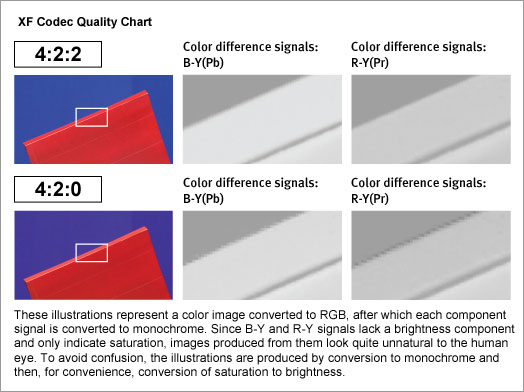
To create digital files robust enough for major post-production, the EOS C300 PL delivers the highest image quality with its XF Codec - the same codec used by other Canon XF-series professional camcorders. With 4:2:2 color sampling, image files have double the vertical resolution of color components created with 4:2:0 color sampling, minimizing jagged edges between red and blue and ensuring ample quality for chroma key compositing with green screens. Thanks to the Canon XF Codec and the EOS C300 PL's superior resolution, original color quality and cinematic look will hold up through post-production - with results that meet or exceed the filmmakers expectations.
Canon EOS C300 PL with PL-Lens Mount
Designed to integrate into existing production setups, the EOS C300 PL is fully compatible with a wide variety of industry-standard PL-mount lenses, ensuring the finest in today's technology and operability will work seamlessly with trusted optics already in the filmmakers possession. Compatibility with Canon's existing PL mount lenses means filmmakers can take advantage of the brilliant new optical designs Canon has developed for the Cinema market.
Canon's amazing CN-E PL mount zoom lenses deliver superlative performance for large-scale, big budget movie productions. The PL CN-E series is 4K ready and comes in two models: Wide Angle CN-E14.5-60mm T2.6 L S/SP and Telephoto CN-E30-300 T2.95-3.7 L S/SP.
Canon EF Cinema Zoom Lenses (PL-mount)Canon's EF Cinema Zoom lenses offers unrivaled optical performance for demanding high-end productions, available in both EF and PL mount configurations. With fluorite, aspherical lens elements and advanced optical design, these unequalled EF Cinema Zoom lenses are capable of 4K-image reproduction. The wide-angle CN-E14.5-60mm T2.6 L S/SP provides industry-leading breadth of range; the telephoto CN-E30-300mm T2.95-3.7 L S/SP rivals best-in-class zoom magnification and telephoto focal length. Together these lenses cover the range most commonly used in cinema shooting.
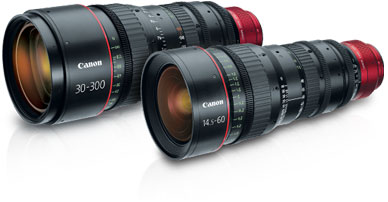
Additional lenses are already under development, reflecting Canon's commitment to offer the broadest range of professional cinema lenses to meet filmmaker's needs, now and in the future.
Designed with Filmmakers in Mind
With everything a cinematographer needs, the EOS C300 PL comes ready to produce. A logical layout of buttons and dials make operation simple. A lock switch turns off all controls except the recording button and function buttons. Small ridges between the buttons help prevent activating functions by mistake. A backlit display panel is great for low-light viewing. A tally lamp is clearly visible from the side or behind the camera.
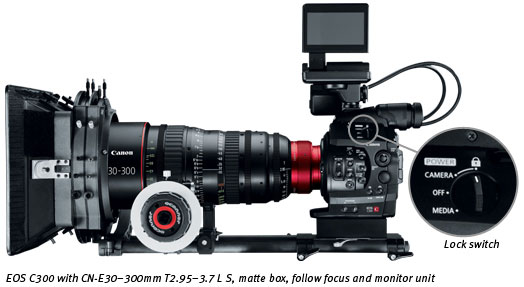
The EOS C300 PL body is surprisingly small (5.24" x 7.0" x 7.0") and easily hand-held at just over 3 lbs. There is a bright 1.55 megapixel electronic viewfinder that comes bundled with a removable combination 4-inch 1.23 megapixel monitor and control panel. The camera also has a removable hand grip with a control dial and function buttons for hand-held shooting in DSLR style - or remove it and use the supplied thumb rest for completely stripped down shooting. The EOS C300 PL has a manually-operated built-in Neutral Density glass filter offering 1/4, 1/16 and 1/64th steps of filtering. Hand-held or using a tripod, on location or in the studio, even on 3-D rigs, the EOS C300 PL fits shooting situations that are challenging for larger cameras.
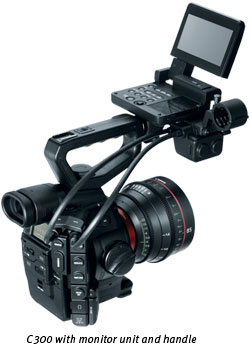
The EOS C300 PL features a 0.52-inch, 1.55 Megapixel Color EVF and approximately 100% field of view coverage for comfortable viewing and accurate judgment of composition, focus and color. The angle of the viewfinder is adjustable for additional user comfort.
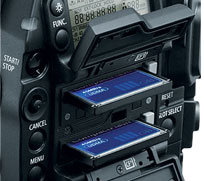
For versatility and reliability, the EOS C300 PL's recording and terminal specifications are completely compatible with the prevailing industry standards. It records to CF cards through dual slots. From a cost and reliability standpoint, CF cards have no equal. Solid state, and easy to find, 2 hours of 4:2:2 50Mbps footage can be recorded on two reusable and hot swappable 32 GB CF cards with ease. It's even possible to record to two CF cards simultaneously and relay-record for uninterrupted shots and copy from one card to another.
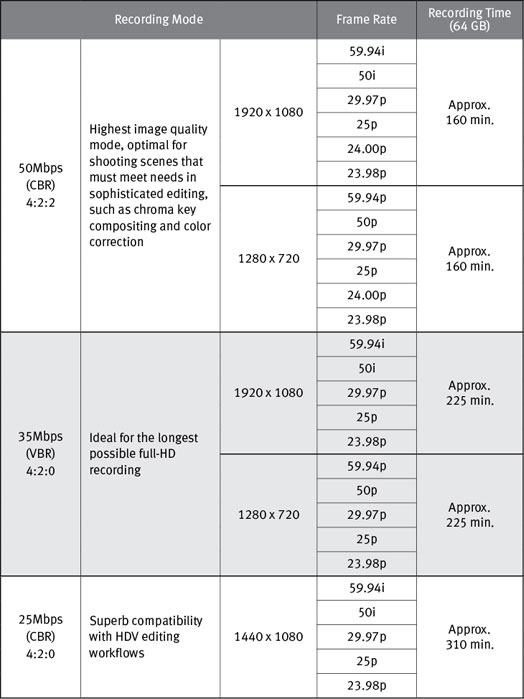
With the realities of production in mind, the EOS C300 PL can record in a number of different modes, resolutions and frame rates, delivering quality recordings perfect for any application. 24.00p mode matches the exact frame rates of film cameras, so there's no need for time-consuming frame-rate conversion. And the camera can shoot in both PAL and NTSC modes at 50 Mbps (CBR), 35 Mbps (VBR) and 25 Mbps (CBR) with a range of settings for resolution, color, frame rate and recording time. Whether shooting with the expectation of significant editing and post-production, recording for compatibility with HDV editing, or simply creating the longest possible HD image files, the EOS C300 PL will perform flawlessly.
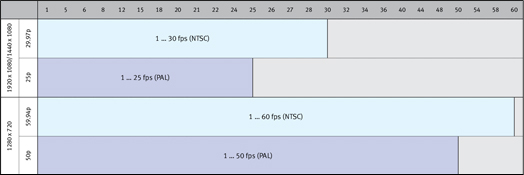
Beyond the advantages of file-based recording, the EOS C300 PL offers a number of creative possibilities in post-production. By capturing fewer frames per second, the camera can transform normal action into intense high-speed motion up to 60x. By capturing more frames per second, the camera can slow down motion to 1/2.5x at 720p. The EOS C300 PL can also be programmed to record a set number of frames at defined intervals for amazing time-lapse photography - and a frame-recording feature is perfect for stop-frame animation.
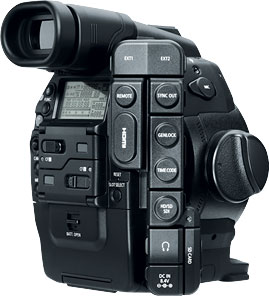
To connect to external monitors, switchers, VTRs and NLE systems with SDI inputs, the EOS C300 PL features industry-standard HD-SDI Output, Genlock, and Timecode terminals plus audio terminals with Linear PCM recording. Timecode and Genlock enable synchronized multiple camera capture, perfect for multiple camera shots, 3D acquisition and more. The HD-SDI Sync terminal can be switched to output to HD Sync, HD Y, Black Burst, and Composite.
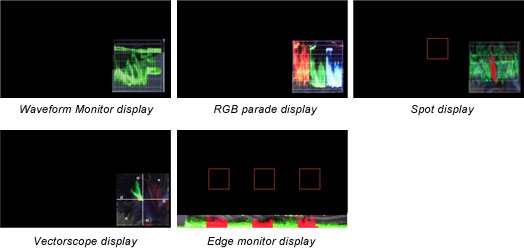
Providing the cinematographer with everything they need in the palm of their hands, the EOS C300 PL comes ready to produce. The cameras have a Waveform Monitor (WFM) function that shows the overall brightness of a scene, with RGB Parade Display to view red, green and blue brightness or Spot Display to isolate the luminance distribution of a chosen area. The Vectorscope (VS) display shows real-time hue and saturation levels. For sharp focus, the EOS C300 PL camera has two peaking modes and a magnified focus assist function. An Edge Monitor Focus Assist provides both a waveform representing the overall degree of focus and a red waveform that represents focus in three specific areas displayed on the camera's 4" LCD monitor. To maintain proper highlight exposure, it offers a zebra bar feature as well. It's all in the camera.
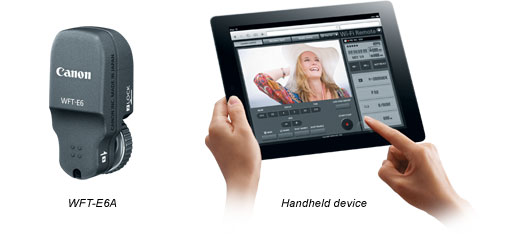
Offering a new level of mobility, the Canon Wireless File Transmitter WFT-E6A opens up a world of wireless options to the EOS filmmaker. The EOS C300 PL comes preconfigured so that camera settings can be viewed and controlled on third party devices with web browsers, including computers, smartphones and tablets without the need for additional in-camera software. With the WFT-E6A module the camera can be controlled from up to 150 feet away over an 802.11 a/b/g/n wireless network. The WFT-E6A enables superior camera control: users can start and stop recording; adjust focus, white balance, gain and other parameters; and adjust the aperture of Canon EF lenses. This offers huge potential for specialty applications where cameras must be controlled remotely such as nature documentaries or reality TV. It also enables input marking for metadata; and offers a live view of the composition. It supports incorporating GPS information into the file metadata - useful for general cinematic applications, and essential for expedition filmmakers. A basic window mode even enables use with the Apple iPhone®, iPod touch® and iPad®, as well as with handheld devices operating the Android™ operating system.
| Standard Definition Or High Definition | High Definition |
| Power Supply Rated | 7.4V DC (Battery Pack), 8.4V DC (DC-IN) |
| Recording Codec | Signal System: NTSC And PAL Compression: 8 Bit MPEG-2 Long GOP Color Space: 4:2:2 At 50Mbps Recording Maximum Bit Rate: 50Mbps (CBR) Canon Log Gamma: Available File Format: MXF (OP-1a) Recording Options: 50Mbps (CBR) 4:2:2 422P@HL 1920x1080: 59.94i/29.97p/23.98p; 50i/25p; True 24 (24.00) 1280x720: 59.94i/29.97p/23.98p; 50p/25p; True 24 (24.00) 35Mbps (VBR) 4:2:0 MP@HL 1920x1080: 59.94i/29.97p/23.98p; 50i/25p 1280x720: 59.94p/29.97p/23.98p; 50p/25p 25Mbps (CBR) 4:2:0 MP@H14 1440x1080: 59.94i/29.97p/23.98p; 50p/25p |
| Audio | Linear PCM; 2-Channel; 16-Bit; 48kHz Built-In Microphone: None External Audio Inputs: 2 - XLR Inputs (Auto And Manual Level Settings) Recording Channel Selection: Two Channel Recording XLR Mic Trimming: Available; -12dB, -6 DB, 0dB Or +12dB Recording Level Adjustment Range: - Infinity To +18dB Phantom Power: Available: +48V Headphone Adjustment: 16 Settings; Volume Is Muted At Lowest Setting 1KHz Tone: Available: -12, -18 Or -20 DB |
| Image Sensor | Sensor Type: CMOS Sensor (Single-Panel), Equivalent To Super 35mm Sensor Size: 24.6 X 13.8mm Effective Screen Size (6.4 X 6.4 Micrometer Pixel Pitch) Scanning System: Progressive Number Of Sensors: 1 Filter: RGB Primary Color Filter (Bayer Array) Imaging Processor: DIGIC DV III |
| Effective Pixels | Approx. 8.29 Megapixels (3840 X 2160) |
| Total Pixels | Approx. 9.84 Megapixels (4206 X 2340) |
| Max Movie Recording Time | 64GB Compact Flash (CF) Card Greater Capacity Is Possible When Both Are Used. 25Mbps: 310 Minutes 35Mbps: 225 Minutes 50Mbps: 160 Minutes |
| Lens | Interchangeable: PL Mount |
| Focusing System | Manual; Autofocus System Not Available |
| Max Shutter Speed | 1/2000 Sec |
| Iso Range | 320 To 20,000, 1-Stop Or 1/3-Stop |
| Nd Filter Settings | Mechanical ND Filter System With Option Of Clear, 2 Stops, 4 Stops, And 6 Stops |
| White Balance | Auto, Manual, 2 Custom (2000K - 150,00K In 100K Increments), Daylight, Tungsten |
| Frame Rate | NTSC: 59.94P, 59.94i, 29.97P, 23.98P PAL: 50P, 50i, 25P Film: 24P |
| Minimum Illumination | Full AUTO Mode: TBA Lux Manual Mode: TBA Lux |
| Genlock Terminal | BNC (Input Only) |
| Hd Sd Sdi Terminal | BNC (Output Only), With Embedded Audio |
| Timecode Terminals | BNC (Input/Output), Sync Out (BNC) |
| Viewfinder | 0.52-Inch Diagonal, Color 16:9 Rotatable LCD +2.0 To -5.5 Diopter Eye Adjustment |
| Lcd Screen Monitor Unit | 4-Inch Diagonal, 1.23 Megapixel Color 16:9 Rotatable LCD 100% Field Of View Adj. Brightness, Contrast, Color, Sharpness And Backlight |
| Microphone | None Built-In |
| Recording Media | CF Card (Type 1 Only): 2 Slots (Movie Files); UDMA Supported SD Card: 1 Slot: Still Images, Custom Picture Data*, Clip Metadata And Menu Settings *Custom Picture Data And Settings Are Not Compatible With Data From Other Canon Models |
| Usb Terminal | N/A |
| Video Terminal | Same As HD/SD-SDI Terminal |
| Audio Terminal | XLR 3-Pin Jack (2), Switchable Between MIC/LINE |
| Hdmi Terminal | Yes (Type A), Output Only |
| Av Mini Terminal Headphone Terminal | 3.5mm Stereo Mini-Jack |
| Wft Terminal | For Compatible Wi-Fi Accessory |
| Operating Temperature Range | Performance: 32°-104°F / 0°- 40°C, 85% (Relative Humidity) Operation: 23°-113°F / -5°-45°C, 60% (Relative Humidity) |
| Dimensions W X H X D | EOS C300 PL + Thumb Rest: 5.2 X 7.0 X 7.0 In / 133 X 179 X 177mm EOS C300 PL + Grip: 6.9 X 7.0 X 7.0 In / 174 X 179 X 177mm Camera + Monitor: 7.3 X 9.8 X 7.4 In / 185 X 249 X 187mm Camera + Handle + Monitor: 7.3 X 11.2 X 11.9 In / 185 X 284 X 301mm (Not Including Lens Hood, Eyecup, Grip Belt) |
| Weight Not Including Lens | Main Unit: EOS C300 PL: 3.6 Lb / 1630g Grip: 8.1 Oz / 230g Monitor Unit: 1.4 Lb / 620g Handle Unit: 6.3 Oz / 180g Thumb Rest: 0.35 Oz / 10g BP-955 Battery: 7.8 Oz / 220g Attachment Fitting: 0.32 Oz / 9g CF Cards X 2: 0.63 Oz / 18g Measure Hook: 0.11 Oz / 3g Body Cap, Camera Cover (Either Type): 0.63 Oz / 18g EOS C300 PL W/: Grip, Monitor, BP-955, 2@CF 6.0 Lb / 2720g Grip, Monitor, Handle, BP-955, 2@CF 6.4 Lb / 2900g |
| Content |
** Not Operational When Using Slow Motion Modes. |
||||||||||||||||||||||||||||||||||||||||||||||||||||||||||||

- Windows Server 2025
- macOS 15
- macOS 14
- macOS 13
- Windows 11
- macOS 12
- Windows Server 2022
- macOS 11
- Linux MIPS
- Linux ARM
- macOS 11.0
- macOS 10.15
- macOS v10.13
- macOS v10.14
- Windows Server 2019 (x64)
- macOS v10.14
- macOS v10.13
- Windows Server 2016 (x64)
- macOS v10.12
- Linux 64bit
- Linux 32bit
- OS X v10.11
- Windows 10
- Windows 10 (x64)
- OS X v10.10
- Windows Server 2012 R2 (x64)
- OS X v10.9
- Windows 8.1 (x64)
- Windows 8.1
- Windows Server 2012 (x64)
- Windows 8
- Windows 8 (x64)
- Windows 7
- Windows 7 (x64)
- Windows Vista
- Windows Vista (x64)
- Windows XP
- Windows XP (x64)
- Windows Server 2008
- Windows Server 2008 (x64)
- Windows Server 2008 R2 (x64)
- Windows Server 2003
- Windows Server 2003 (x64)
- Windows Server 2003 R2
- Windows Server 2003 R2 (x64)
- Windows 2000
- Windows NT
- Windows 3.1
- Windows Me
- Windows 98
- Windows 95
- Mac OS X v10.8
- Mac OS X v10.7
- Mac OS X v10.6
- Mac OS X v10.5
- Mac OS X v10.4
- Mac OS X v10.3
- Mac OS X v10.2
- Mac OS X v10.1
- Mac OS X
- Mac OS 9
- Mac OS 8
- Linux (x64)
- Linux (x32)
- Linux
- Not Applicable