Cases / Video
Explore null | Canon Latin America

XC10
The Canon XC10 4K Camcorder features a compact, lightweight and versatile design for convenient 4K UHD/Full HD video shooting and 12 Megapixel digital still photography.
- XC10 4K Camcorder
- Shoulder Strap
- Lens Cap
- Hood Unit
- Viewfinder Unit
- High-speed HDMI Cable
- USB Cable
- Battery Pack (LP-E6N)
- Compact Power Adapter (CA-570)
- Remote Controller (RC-6)
The Canon XC10 4K Camcorder features a compact, lightweight and versatile design for convenient 4K UHD/Full HD video shooting and 12 Megapixel digital still photography. This all-in-one ergonomically convenient camcorder can satisfy a broad range of video and still production needs. The XC10 4K Camcorder is for everyone from next-generation advanced amateurs to professional 4K and HD videographers, from digital filmmakers needing a cost-effective 4K UHD/HD "B" or "C" camera to multimedia journalists and news agencies seeking a 4K video camera. The XC10 4K Camcorder also appeals to the needs of cross media professionals in that it can also capture 12 Megapixel still images and provide 8 Megapixel stills extracted from 4K UHD motion video.
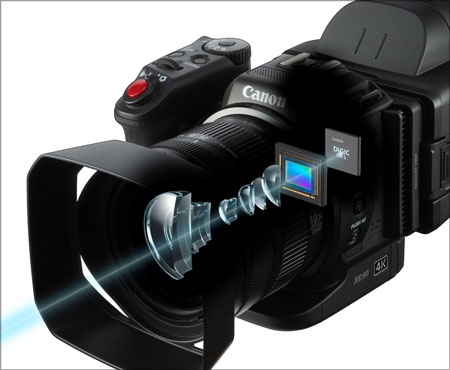
The XC10 Camcorder's 4K imaging system is purpose-built of proprietary components, including a Genuine Canon 10x Wide-Angle Zoom Lens with 2x Digital Teleconverter and Optical Image Stabilization. Employing a special Canon compact optical system, the lens offers a zoom ratio of 27.3-273mm for movies and 24.1-241mm for photos. The XC10 4K Camcorder also features a specially designed Canon 12 Megapixel one-inch CMOS sensor that can deliver 12 stops of exposure latitude. And the new DIGIC DV5 signal processor that provides the image-processing power and speed to deliver high image quality, performance and innovative new features like the Canon XF-AVC codec for 4K UHD and HD recording.
Operability innovations designed into the XC10 4K Camcorder further facilitate creative expression and the ability to capture superb 4K UHD/HD video and high-resolution still images. These include a Vari-Angle LCD monitor with a capacitive touch-panel for simple intuitive control, a rotating hand grip to support both movie and still-image shooting, a built-in ND filter, built-in dual-band Wi-Fi, and much more. The camcorder can be hand-held, or used with a wide range of camera-support accessories, including car mounts and drones.
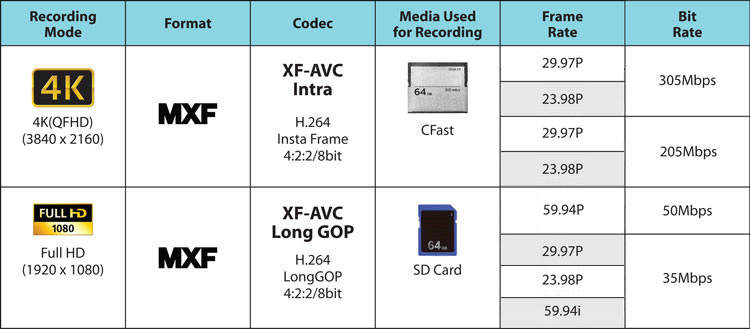
Offering slow- and fast-motion recording, multiple custom picture settings including Canon log and Canon Wide DR Gamma, and interval shooting for time-lapse still photography, the XC10 4K Camcorder offers a wide range of workflow option. The camcorder can record H.264 4:2:2/8-bit MXF 4K (QFHD) 3840 x 2160 movies to internal CFast cards or Full HD 1920 x 1080 video to SD cards at multiple frame and bit rates (up to 305Mbps in 4K). The XC10 4K Camcorder also offers 4K UHD 30p movie playback output via its HDMI 1.4 output.
Still-photography features include a mechanical shutter to help eliminate rolling-shutter distortion, up to 2.8 fps performance, support for multiple aspect ratios, and compatibility with such EOS accessories as Speedlite flash units, Canon GPS receivers, remote controllers, and LP-E6 series batteries and chargers.
Versatile, compact, and convenient, the XC10 4K Camcorder is a lightweight 4K UHD/HD/still photography hybrid delivering high image quality and convenience to meet the diverse imaging needs of today's expanding universe of budget-conscious digital content creation professionals.
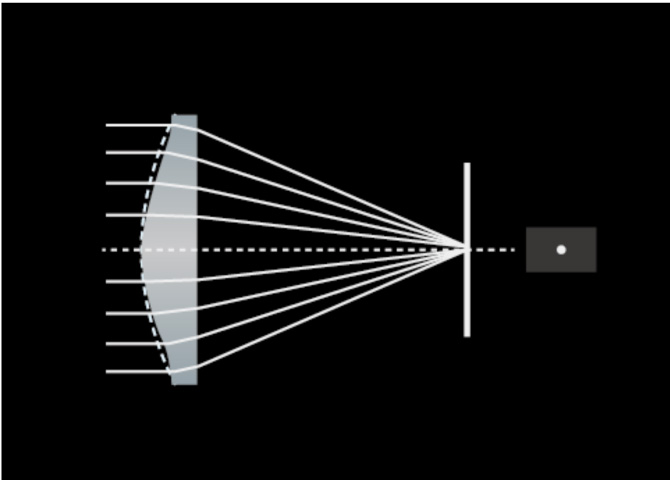
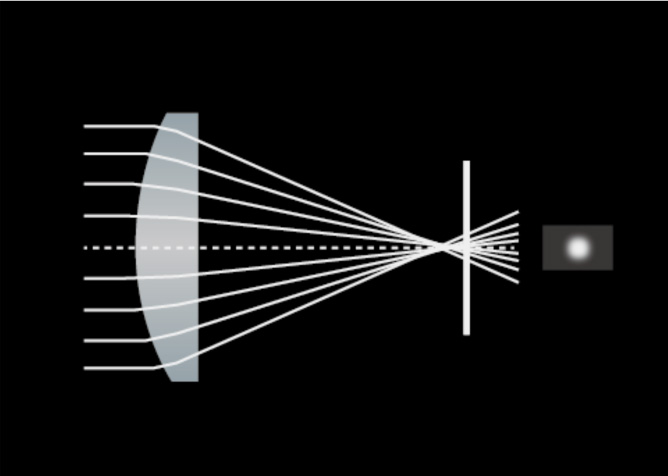
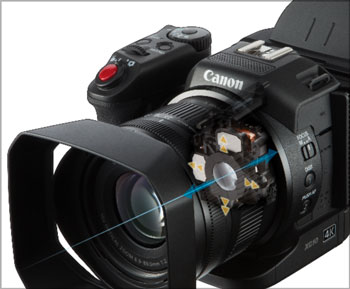
 The Canon XC10 4K Camcorder incorporates a Canon 4K video lens that leverages proprietary Canon optical technologies derived from years of experience in developing Cinema, Broadcast, and EF Series lenses. This 10x wide-angle optical zoom lens offers a focal range of 24.1-241 mm for photos and 27.3-273 mm for movies. The use of UD (Ultra-low Dispersion) and Hi-UD lens elements helps compensate for chromatic aberrations and provides a compact size. An innovative retractable lens barrel structure integrating internal guide bars helps facilitate precise lens movement during zooms, and extends the lens barrel by a mere 36.2mm.
The XC10 Camcorder's 4K Wide-Angle 10x Zoom lens features separate focus and zoom rings for professional-style manual lens operation. (Auto Focus can also be engaged, and focus can be controlled via the optional Canon RC-6 wireless remote controller or web browser via the XC10 4K Camcorder’s Wi-Fi connection.) The rotation angle of the zoom ring is approximately 71°, allowing for rapid manual zooming. Clearly engraved focal length marks and the WIDE and TELE mechanical ends combine to further improve usability.
| |||||||||
Built-in Canon Optical Image Stabilization enhances the one-person operation ease of the XC10 4K Camcorder. Three modes of Image Stabilization are offered (Dynamic, Standard, and Powered) to suit a range of shooting situations. Canon AF (Auto Focus) with Face AF tracking mode provides additional operator assistance. The XC10 4K Camcorder’s 10x zoom lens also includes a 2x digital teleconverter that can be switched on in MOVIE mode for added image magnification.
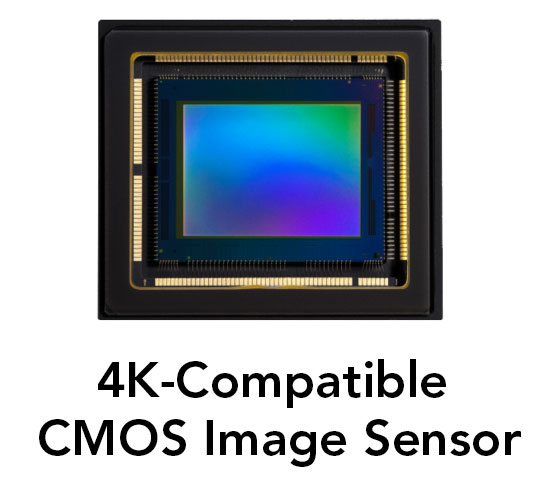 The XC10 4K Camcorder features a new Canon 12.0 Megapixel 1-inch CMOS image sensor with 12 stops of dynamic range, and video and photo shooting functionality. The hybrid design makes the XC10 4K Camcorder a true crossover capable of satisfying the needs of both video and still workflows. With capture that includes both 4K UHD and Full HD (FHD) video and still capture up to 12.0 Megapixels, the XC10 4K Camcorder is a strong contender in both market categories.
The advanced CMOS sensor uses Over-Sampling HD Processing for 1920x1080 capture, the same high-image-quality signal-processing system used by the high-end Canon EOS C500 4K Cinema camera.

The effective pixel total for the sensor’s area ratio is approximately 6.8 times larger - and its area ratio per pixel approximately 1.6 times greater - than previous Canon HD CMOS PRO sensors. The result is low noise for low-light shooting, an impressive signal-to-noise ratio, and greater flexibility for creative shallow depth-of-field focusing effects.
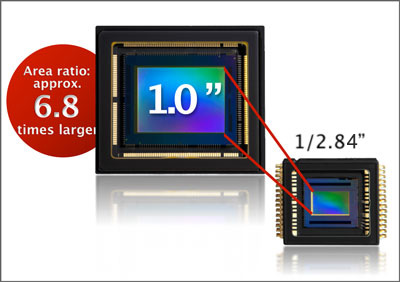 |
Approx. 6.8 times larger than before |
The Canon XC10 4K Camcorder incorporates Canon’s new DiG!C DV5 processor. This advanced core technology component provides the image-processing power and speed that enables such features as 4K UHD video acquisition, Image Stabilization, slow and fast motion recording and precision AF. DiG!C DV 5 is integral in providing high image quality, advanced performance and convenient operability.
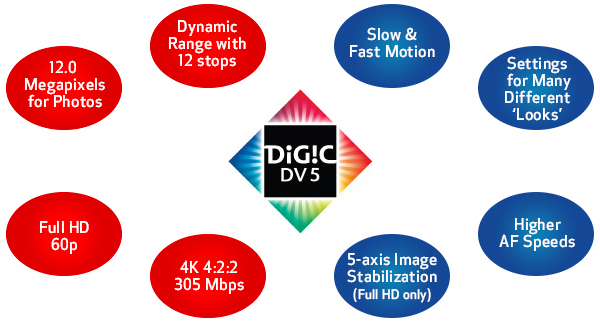
The Canon XC10 4K Camcorder incorporates the new Canon XF-AVC Codec to balance ease of workflow with a high standard of image quality. For 4K UHD recording, the high-image-quality XF-AVC Intra-Frame encoding is used, which captures all the detail and resolution of the CMOS sensor on a frame-by-frame basis, enabling edits to be made at any point in a motion sequence and high-quality stills to be extracted from any 4K UHD motion-image frame.
For HD recording, the camera’s AVC Long GOP (Group of Pictures) encoding is used to help maintain outstanding quality and efficient data rates. Both XF-AVC codecs deliver H.264 4:2:2 8-bit MXF recording for full 4K UHD recording up to 30p and HD recording up to 1080/60p HD.
4K Image Quality with a High Bit Rate of 305 Mbps
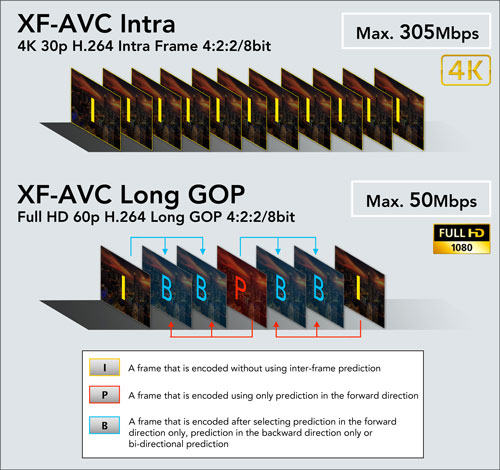
Multiple Recording Modes, Resolutions, and Frame Rates make the XC10 Canon 4K Camcorder creatively flexible in a variety of production environments.
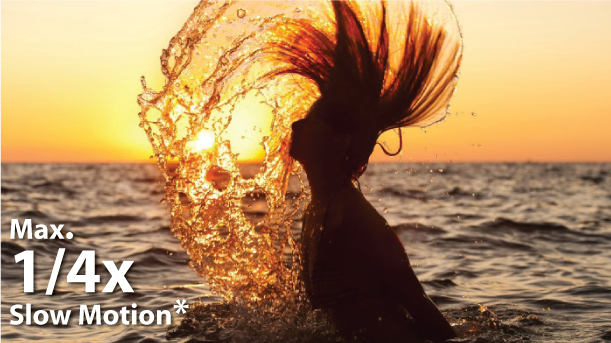
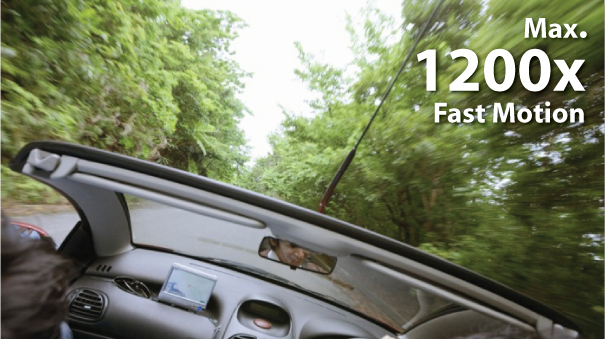
 Creative expression capabilities of the Canon XC10 4K Camcorder include Slow- and Fast-Motion recording. Depending on the camcorder’s record settings video can be recorded down to the slowest speed of 1/4x real-time (in 1280 x 720 resolution/120p) to a max of 1200x in Fast Motion.
Slow Motion |
Fast Motion
| |
 |  | |
|
Images are simulated
| ||
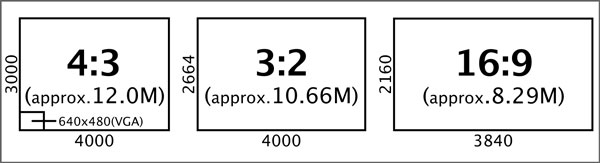
 The Canon XC10 4K Camcorder's advanced still photo capture capability allows you to record photos with the high image quality of up to 12 effective Megapixels using a mechanical shutter for stills in three different aspect ratios.
 |
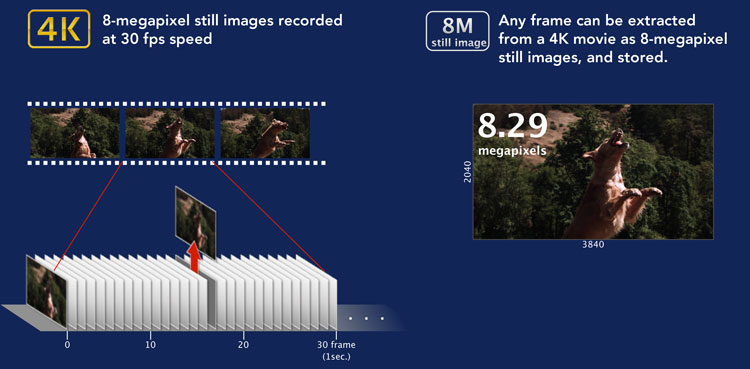
4K Frame Grab
| In-camera 8.3 Megapixel still photos can be extracted from 4K UHD video files. After creating a 4K UHD video movie, users can extract any frame they wish and convert it into a high-quality still photo. |
 |
Recording 4K UHD video requires professional quality media capable of keeping up with the 305 Mbps codec of Canon’s XC10 Camcorder. The camcorder features CFast recording technology to meet the 4K UHD data requirements of Canon’s XF-AVC codec. CFast is a next generation nonproprietary recording solution supported by both Canon and a variety of third-party vendors. Its high speed and durability is a perfect match to the XC10 4K Camcorder to help provide quality, performance and confidence in recording.
The XC10 4K Camcorder also features an SD card slot, allowing Full HD video and photos to also be recorded separately on an SD card.

As of June 2015, compatibility has been verified for the following CFast memory cards:

Proper operation can not be guaranteed for all recording media. Long term usage may reduce a CFast card's write speed. We recommend users regularly fully format and refresh their card using the "Full Format and Refresh Tool".
The Canon XC10 4K Camcorder features the Canon Log gamma setting that sets the camera to maximize dynamic range and provide a wide exposure latitude. This is the same log curve used in both the EOS C300 and EOS C500 Cinema cameras, which helps maximize compatibility when the XC10 4K Camcorder is used in conjunction with them on the same shoot. The files produced using Canon Log can be ideal for post-production color-correction, matching and grading, as they provide users with a high level of creative post-production freedom while maintaining high image quality. When using Canon Log, the XC10 4K Camcorder can provide a dynamic range up to 800% or 12-stops.
The Canon XC10 4K Camcorder also provides the Canon Wide Dynamic Range Gamma function that allows users to get many of the benefits of Canon Log Gamma while maintaining an 18% graypoint similar to Rec. 709. By using this setting, users can maintain the full dynamic range of the sensor without the need for extensive post processing.
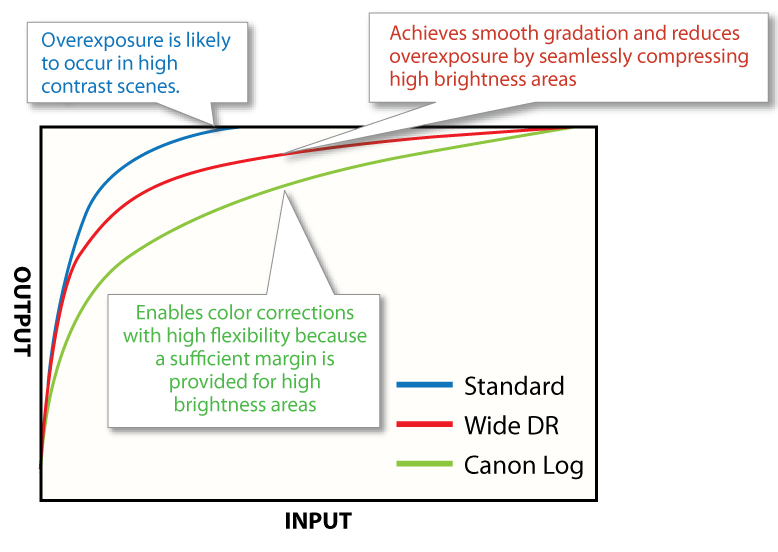
Working in concert, the Canon 12.0 Megapixel 1-inch CMOS sensor, DiG!C DV 5 processor, and XF-AVC Codecs enable the Canon XC10 4K Camcorder to capture bright, highly detailed images at up to 20,000 ISO with a high dynamic range (12 stops of exposure latitude), and low picture noise.
The XC10 4K Camcorder shares a variety of image quality settings with other Canon Cinema EOS cameras including Canon Log, Wide DR, and EOS Std. This helps allow for video captured with the XC10 4K Camcorder to match the "look" of video captured with other Cinema EOS and EOS cameras. The XC10 4K Camcorder features a log gamma setting that sets the camera to maximize dynamic range and provide wide exposure latitude. This is the same log curve used in both the EOS C300 and EOS C500 cinema cameras, helping to maximize compatibility when multiple cameras are used on the same shoot. This is especially helpful in post-production, where corrections, color matching and grading are applied.
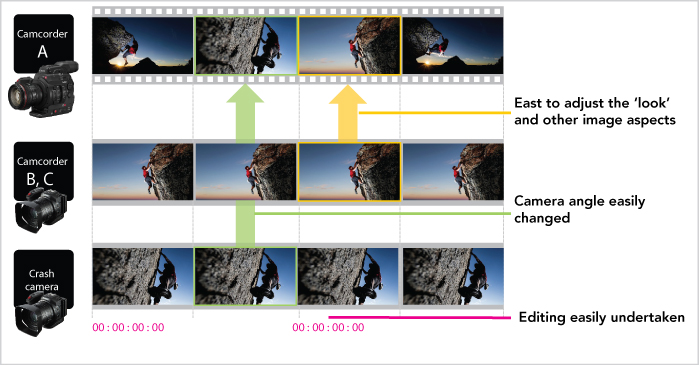 |
Photos used for illustration purposes only. |
The Canon XC10 4K Camcorder is compact, ergonomic, and light weight, broadening the range of possibilities for image expression- offering innovative shooting potential in situations where a larger camera can’t be used.
Viewfinder
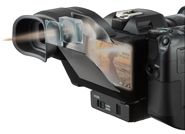 The included viewfinder unit helps make shooting outside a breeze. This new accessory uses two reflecting mirrors to optically refract the image on the LCD monitor. It also supports low-angle shooting, and provides a user-friendly viewing environment.
Freestyle Rotating Handgrip
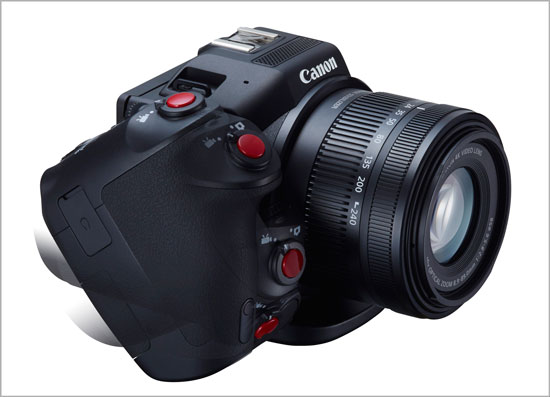 The rotating handgrip on the XC10 4K Camcorder can be rotated to various positions and stopped at different points to allow for comfortable shooting at high angles, low angles, and even in between. The grip contributes to the camcorder’s intuitive user (UI) interface with multiple easy-to-see and easy-to-adjust controls based on the familiar UI design of Canon EOS series cameras. Handgrip controls include the record button (clearly marked in red), a multi-selector thumb-control dial with a mechanical lock and a design similar to those of still cameras for quick-operation settings and highly visible profiles, a menu button, and other smoothly recessed buttons that stay out of the way but are always there when you need them.
Integrated LCD with Touch Panel
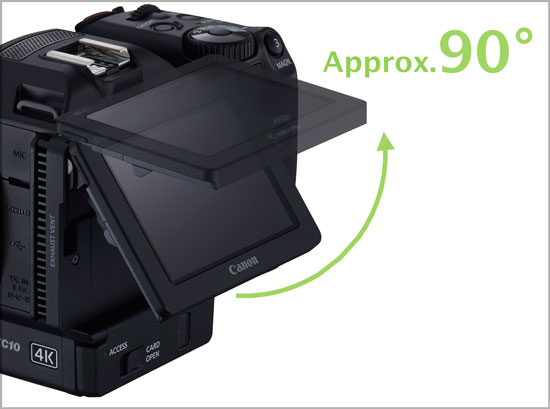
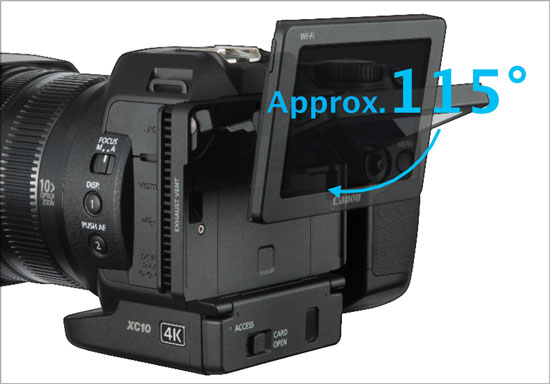
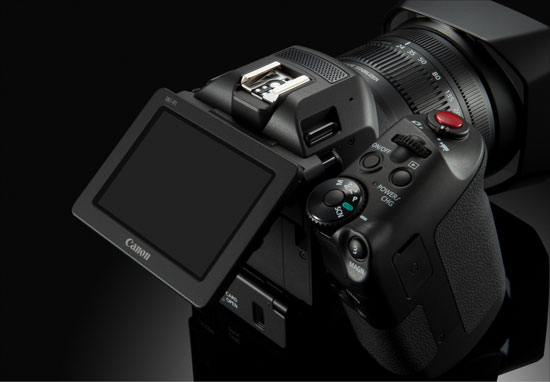 A three-inch 1.03-million-dot tilting LCD monitor provides Canon XC10 4K Camcorder with a bright, vivid-color display for shooting and playing back footage. The LCD’s innovative two-axis parallel hinge mechanism allows the display to be placed in optimal positions for shooting at a variety of angles, from low to high. This LCD also integrates a highly advanced capacitive touch-panel for easy fingertip control of all camera functions and settings. Camera information can be displayed on-screen for clear and easy visual recognition of selected menu items, and users can also swipe from one menu page to another without vertical scrolling. The user interface of the XC10 4K Camcorder borrows many of the concepts from the Canon EOS system making the camera intuitive and easy to operate for users familiar with other Canon products.
 |  |
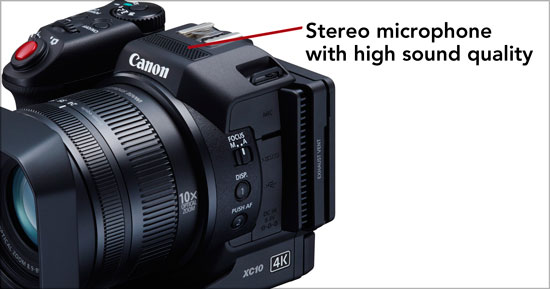
Built-In Microphone
A built-in stereo microphone delivers linear PCM 48 kHz 16-bit audio recording. A separate mini-jack on the camcorder body also enables users to connect an external microphone.
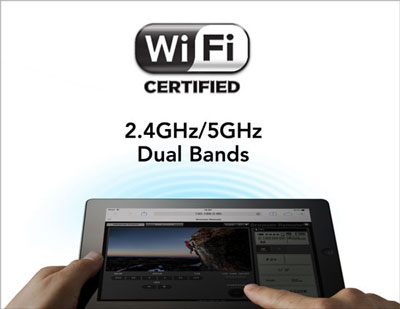
The Canon XC10 4K Camcorder incorporates dual built-in 5 GHz and 2.4 GHz band wireless networks. This functionality provides both a Browser Remote and Browser Preview. By using Browser Remote, camcorder operations can be performed remotely from a web browser on a compatible smartphone or computer. Browser Preview allows users to look at still photos recorded in the camera without the need to remove media from the camera.
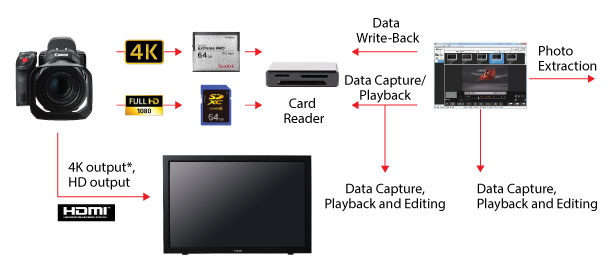
The Canon XC10 4K Camcorder offers a true hybrid workflow solution for creatives that need to integrate both high quality video and still acquisition into their productions. The camcorder offers the ability to capture both 4K UHD and HD imagery at a variety of frame rates and resolutions. Individual frames from the Canon XC10’s 4K UHD video can be extracted in camera or post and used as 8.3 Mpx still images. The XC10 4K Camcorder is also a fully functional 12Mpx still camera that is compatible with a wide variety of Canon photo accessories including Speedlite flashes, GPS Receiver, and remote controller.
The hybrid nature of the XC10 4K Camcorder enables it to be compatible with a wide variety of Canon accessories. A “hot shoe” atop the XC10 provides communication to compatible accessories.
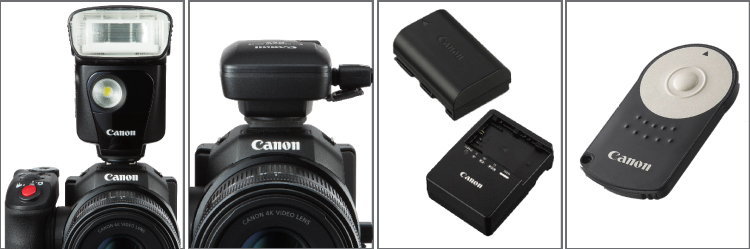 | |||
Speedlites
|
GPS Receiver
| Battery | Remote |
The high level of compatibility of the XC10 4K Camcorder allows the flash unit settings to be selected from the camcorder. The Speedlite 320EX (pictured above), 600EX-RT, 58-EX II, 430EX II and 270EX II Speedlites can all be used with the camcorder. The Speedlite 320EX features a video light for movie shooting.
GPS Receiver
The GP-E2 GPS Receiver adds GPS information to the photo and movie data. The GPS information of MXF movies can also be viewed using the XF-Utility.
Battery Pack/Chargers
The XC10 4K Camcorder is compatible with the EOS LP-E6N series of batteries and the LC-E6 battery charger.
Remote Controller
The RC-6 remote controller features a photo and movie mode. In photo mode, the user can initiate shooting straight away or on a 2 second delay. In movie mode, recording can be started and stopped with the press of a button.

Soft Carrying Case SC-2000
Protect your camcorder with the professional-quality SC-2000 Soft Carrying Case, featuring secure compartments for filters and extra battery packs.
Controllers: Remotes / Wireless / Microphones
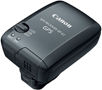
GPS Receiver GP-E2
Rugged and lightweight design. Records location as EXIF information to images when shooting. Can act as a stand-alone GPS logger. Camera time can be synched by the built-in atomic clock.
Cables & Cords
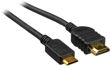
HTC-100
Mini-HDMI Cable: connects Canon HD Camcorders/select PowerShot Cameras to HDMI compatible TV.
Adapters / Chargers / Couplers /Stations

Compact Power Adapter CA-570
This compact adapter powers your camera from an AC power supply and charges your batteries on the camera. This allows for uninterrupted recording of your special events and keeps your batteries ready to go.

Battery Charger LC-E6
Battery Charger for NP-E6 Li-ion Batteries.
Batteries & Grips

Battery Pack LP-E6N
Rechargeable lithium-ion battery. Compatible with Canon LC-E6 and Canon LC-E6E battery chargers.

Filter & Sort
Filtrar y ordenar
Filtrar e ordenar
Download Type
Tipo de descarga
Tipo de download
2. Select the Version
- Windows Server 2025
- macOS 15
- macOS 14
- macOS 13
- Windows 11
- macOS 12
- Windows Server 2022
- macOS 11
- Linux MIPS
- Linux ARM
- macOS 11.0
- macOS 10.15
- macOS v10.13
- macOS v10.14
- Windows Server 2019 (x64)
- macOS v10.14
- macOS v10.13
- Windows Server 2016 (x64)
- macOS v10.12
- Linux 64bit
- Linux 32bit
- OS X v10.11
- Windows 10
- Windows 10 (x64)
- OS X v10.10
- Windows Server 2012 R2 (x64)
- OS X v10.9
- Windows 8.1 (x64)
- Windows 8.1
- Windows Server 2012 (x64)
- Windows 8
- Windows 8 (x64)
- Windows 7
- Windows 7 (x64)
- Windows Vista
- Windows Vista (x64)
- Windows XP
- Windows XP (x64)
- Windows Server 2008
- Windows Server 2008 (x64)
- Windows Server 2008 R2 (x64)
- Windows Server 2003
- Windows Server 2003 (x64)
- Windows Server 2003 R2
- Windows Server 2003 R2 (x64)
- Windows 2000
- Windows NT
- Windows 3.1
- Windows Me
- Windows 98
- Windows 95
- Mac OS X v10.8
- Mac OS X v10.7
- Mac OS X v10.6
- Mac OS X v10.5
- Mac OS X v10.4
- Mac OS X v10.3
- Mac OS X v10.2
- Mac OS X v10.1
- Mac OS X
- Mac OS 9
- Mac OS 8
- Linux (x64)
- Linux (x32)
- Linux
- Not Applicable
3. Software and Drivers Results
Results will appear after selecting an Operating System and Version above.