Explore null | Canon Latin America
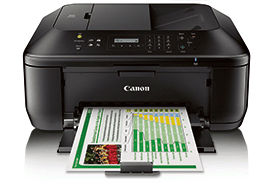
PIXMA MX471
- Enjoy new levels of printing convenience with utilizing features such as AirPrint and Google Cloud Print.
- The Automatic Document Feeder holds 30 sheets, making it easier to copy, scan or fax multiple page documents.
- FastFront enables you to quickly and easily change ink and add paper all from the front of the printer.
- With the optional XL or XXL pigment black ink cartridge, you won't have to replace your ink cartridges as often.
- MX471 Wireless Office All-In-One Printer
- Power Cord
- FINE Cartridges
- Setup CD-ROM
- Telephone Line Cable
- Manuals and Other Documents
- Office Application Insert
- CLA Contact Sheet
Business Quality-Printing Right From Your Smart Device
Maximize your daily efficiency with the PIXMA MX471 Wireless Office All-In-One Printer. The PIXMA MX471 excels in connectivity. With Google Cloud Print™ and AirPrint™, you can print wirelessly from your compatible smartphone or tablet from virtually anywhere around the office. It's loaded with timesaving features as well, including an automatic document feeder which holds up to 30 sheets. And when it comes time to change ink or add paper, the FastFront feature makes it quick and easy-right at the front of the printer! Plus, the optional XL or XXL pigment black ink cartridges mean you can print longer before having to replace your cartridges.
Another great feature of the PIXMA MX471 is My Image Garden software. My Image Garden puts all your favorite printing features, such as Fun Filter Effects and Full HD Movie Print, in one convenient software application. It helps you organize your photos with calendar view and facial recognition.
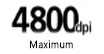












High Resolution: 4800 x 1200 maximum color dpi3 produces incredible quality and detail in both your business documents and photos.
FINE: Features Full-photolithography Inkjet Nozzle Engineering (FINE) with a patented print head firing ink droplets as small as 2pl.
4 Color Cartridge System: Integrates the FINE print head and ink into one compact unit for easy replacement.
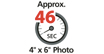
Borderless Photos Fast: Print a beautiful, borderless 4" x 6" photo in approximately 46 seconds.5,12
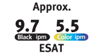
Print Documents and Web Pages Fast: Print documents and Web pages with fast speeds of 9.7 images per minute (ipm) for black and 5.5 images per minute (ipm) for color.4
Fully-Integrated, 30-sheet Auto Document Feeder: Easily copy, scan and fax multiple documents without having to load them one page at a time. Enjoy full integration so the printer can better fit in tight workspace areas.
My Image Garden: My Image Garden software makes organizing and printing your photos fun and easy with great facial recognition, Special Filters, Calendar Organization, Automatic Layout Suggestions and so much more!7
Fast Front: Quickly change ink or add paper at the front of the printer.
CREATIVE PARK PREMIUM: An exclusive service for users of genuine Canon inks, offering access to photos, templates and more.8
Quiet Mode: This considerate feature lets you print anytime without worrying about disturbing those around you.
Auto Scan Mode: Automatically recognizes the type of original, then scans and saves it with the suitable settings.9
Built-In Wireless: Print and scan wirelessly from any Wi-Fi® enabled computer around the house.1
PIXMA Printing Solutions (PPS): PIXMA Printing Solutions (PPS) lets you print and scan photos or documents from your mobile device using the free PPS app.2
AirPrint: Print wirelessly and effortlessly from your compatible iPhone®, iPad®, or iPod touch® - no drivers needed!10
Google Cloud Print™: Allows users to print from Gmail™ and Google Docs™ on a mobile device, and from Google Chrome™ browser for Mac®, Windows®, Linux®, and Chrome™ devices. With Google Cloud Print, you can print from wherever you are, from applications you use every day. You can even share your home and work printers with anyone you choose.11
Super G3 Fax: The high speed business fax15 standard for color and PC facsimiles on plain paper meets the home office workhorse with 19 coded speed dials and memory for up to 50 incoming pages.17
Hi-Speed USB: Plug the cable into your PC for a super-fast connection for your data transfers.
- AirPrint functionality requires an iPad, iPhone 3GS or later, or iPod touch 3rd generation or later device running iOS 4.2 or later, and an AirPrint-enabled printer connected to the same network as your iOS device. A printer connected to the USB port of your Mac, PC, AirPort Base Station, or Time Capsule is not supported.
- Requires an Internet connection and Google account. Subject to Google Terms of Service. Certain exceptions may apply.
- Resolution may vary based on printer driver setting. Color ink droplets can be placed with a horizontal pitch of 1/4800 inch at minimum.
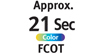
- ISO/IEC 24734, 24735 define the default print and copy speed measurement methods. Print speeds are the averages of ESAT in Office Category Test for the default simplex mode, ISO/IEC 24734, excluding time to print the first set. Copy speed is the average of FCOT, ISO/IEC 24735 Annex D. ADF copy speed is the average of ESAT in General Performance Test for the default simplex mode, ISO/IEC 24735, excluding time to copy the first set..
- Photo print speeds are based on the standard mode driver setting using photo test pattern(s) and select Canon Photo Paper. Print speed is measured as soon as first page begins to feed into printer and will vary depending on system configuration, interface, software, document complexity, print mode, types of paper used, and page coverage. See www.cla.canon.com/printspeed for additional information.
- Optical resolution is a measure of maximum hardware sampling resolution, based on ISO 14473 standard.
- To install using Windows®; OS, .NET Framework 4 is required. Compatible still image formats are PDF (created using Canon PDF Creator only), JPEG (Exif), TIFF, and PNG. Compatible video formats are MOV (from select Canon digital cameras only) and MP4 (from select Canon digital camcorders only).
- CREATIVE PARK PREMIUM is a premium content service available exclusively to users only when all of the colors of genuine Canon inks and all of the software that came with the printer are properly installed.
- For network users, Auto Scan Mode is only available when scanning at a computer using MP Navigator EX software and selecting the 1-click feature then "Save to PC."
- Wireless printing requires a working Ethernet network with wireless 802.11b/g or n capability. Wireless performance may vary based on terrain and distance between the printer and wireless network clients.
- Requires an Internet connection and the PIXMA Printing Solutions ("PPS") app, available for free on the App Store and at Google Play. Compatible with iPad, iPhone 3GS or later, and iPod touch 3rd generation or later devices running iOS 5.1 or later, and Android mobile devices running Android 2.3 or later. Your device must be connected to the same working network with wireless 802.11 b/g/n capability as your printer. For users of compatible Apple mobile devices, document printing requires Apple AirPrint, which requires an AirPrint-enabled printer connected to the same network as your iOS device. A printer connected to the USB port of your Mac, PC, AirPort Base station, or Time Capsule is not supported.
- Envelopes and High Resolution Paper are NOT supported for borderless printing.
- "Full HD Movie Print" is available from "MOV" and "MP4" movie files created by select Canon EOS Digital SLRs, PowerShot, and VIXIA digital cameras and camcorders. Requires PC or Mac with Intel®; processor and Canon ZoomBrowser EX 6.5 or later or Canon ImageBrowser 6.5 or later for "MOV" files, or Canon ImageBrowser EX 1.0 or later for "MOV" or "MP4" files. Print quality is determined by the video resolution. Function does not upscale video resolution.
- The Public Switched Telephone Network currently supports fax modem speeds of 28.8 Kbps or lower, depending on telephone line conditions. Sending and receiving fax machines need to conform to ITU-T v.34 guidelines.
- Black & white document fax transmission speed is based on default setting using ITU-T No.1 chart. Color document fax transmission speed is based on default setting using Canon Color Fax Test Sheet. Actual transmission speed may vary depending on document complexity, fax setting at receiving end, and line conditions etc.
- Page count is based on ITU-T No.1 chart or Canon FAX Standard Chart No.1.
- System requirements vary by application. For Mac OS, an Internet connection is required during software installation. For Windows OS, .NET Framework 4 is required to install My Image Garden, Quick Menu, and Easy-WebPrint EX software.
- Easy-WebPrint EX requires Internet Explorer 7 or 8 for Windows, Internet Explorer 9 or 10 for Windows Vista SP2 (or later) or Windows 7, or Safari 4.0 - 5.0 for Mac OS X v10.5.8 – 10.6.x.
| Print Speed Text | 4" X 6" Borderless Photo: Approx. 46 Seconds4,5 |
| Print Speed Choice | Black |
| Print Speed Text | ESAT: Approx. 9.7 Ipm4,5 |
| Print Speed Choice | Color |
| Print Speed Text | ESAT: Approx. 5.5 Ipm4,5 |
| Nozzle Text | Black: 1,152 Color: 640 Total: 1,792 |
| Picoliter Size | 2 And 5 |
| Resolution Color Choice | Color |
| Resolution Text | Up To 4800 X 1200 Dpi3 |
| Resolution Color Choice | Black |
| Resolution Text | Up To 600 X 600 Dpi3 |
| Ink Compatibility | PG-140XXL Black Ink Cartridge PG-140XL Black Ink Cartridge PG-140 Black Ink Cartridge CL-141XL Color Ink Cartridge CL-141 Color Ink Cartridge |
| Paper Sizes | 4" X 6", 5" X 7", 8" X 10", Letter, Legal, U.S. #10 Envelopes |
| Automatic Sheet Feeder | 100 Sheets ADF:30 Sheets |
| Paper Compatibility | Plain: Plain Paper, High Resolution Paper; Super High Gloss: Photo Paper Pro Platinum; Glossy: Photo Paper Plus Glossy II, Photo Paper Glossy; Matte: Matte Photo Paper; Envelope: U.S. #10 Envelope |
| Print Features | AirPrint1, Borderless Printing12, Document Printing, Full HD Movie Print13, Fun Filter Effects, Google Cloud Print2, My Image Garden7, Photo Printing, PIXMA Printing Solutions11, Quiet Mode, Wireless Printing10 |
| Mono Copy Speed Up To | ESAT: Color: 4.7 Ipm4 |
| Reductions Enlargement | 25% - 400% |
| Copy Feature | Auto Document Feeder (ADF), AE (Auto Exposure) Copy, Borderless, Fit-To-Page, Preset Copy Ratios, Frame Erase Copy, Zoom |
| Scanning Element | Contact Image Sensor (CIS) |
| Max Resolution Text | Optical: 1200 X 2400 Dpi |
| Max Resolution Text | Interpolated: 19,200 X 19,200 Dpi |
| Max Resolution Text | ADF: 600 X 600 Dpi (Optical) |
| Scanner Features | Auto Scan Mode9, Network Scan, Push Scan |
| Color Depth | 48-Bit Internal/24-Bit External |
| Max Document Size | Flatbed: 8x5" X 11.7" ADF: 8.5" X 14" |
| Modem Speed | 33.6 Kbps (Super G3 Color FAX)14 |
| Transmission Speed Approx | Black: Approx. 3 Sec Per Page15 Color: Approx. 1 Min Per Page15 |
| Transmission Reception Memory | Approx. 50 Pages16 |
| Group Dialing | 19 Locations |
| Fax Features | Answering Machine Connectivity, Caller Rejection, Check RX Fax Info., Fax Reception Reject, Fax Num¬Ber Re-Entry, Memory Transmission, Redial, Remote Reception |
| Other Features | 2-Line LCD, Dual Color Gamut Processing Technology, Fully Integrated Auto Document Feeder (ADF), Wireless Printing10 |
| Os Compatibility | Computer Operating Systems: Windows&Reg; 8, Windows 8.1, Windows 7,17 Windows 7 SP1, Window Vista SP1, Vista SP2, Windows XP SP3 32-Bit17 Mac OS X V10.6.8- V10.917 Mobile Operating Systems: IOS, Android, |
| Standard Interface | Wireless LAN (IEEE 802.11b/G/N)10 Hi-Speed USB |
| Dimension W X D X H | 18.1" (W) X 15.2" (D) X 7.9" (H) |
| Weight | 18.4 Lbs |
- AirPrint functionality requires an iPad, iPhone 3GS or later, or iPod touch 3rd generation or later device running iOS 4.2 or later, and an AirPrint-enabled printer connected to the same network as your iOS device. A printer connected to the USB port of your Mac, PC, AirPort Base Station, or Time Capsule is not supported.
- Requires an Internet connection and Google account. Subject to Google Terms of Service. Certain exceptions may apply.
- Resolution may vary based on printer driver setting. Color ink droplets can be placed with a horizontal pitch of 1/4800 inch at minimum.
- ISO/IEC 24734, 24735 define the default print and copy speed measurement methods. Print speeds are the averages of ESAT in Office Category Test for the default simplex mode, ISO/IEC 24734, excluding time to print the first set. Copy speed is the average of FCOT, ISO/IEC 24735 Annex D. ADF copy speed is the average of ESAT in General Performance Test for the default simplex mode, ISO/IEC 24735, excluding time to copy the first set..
- Photo print speeds are based on the standard mode driver setting using photo test pattern(s) and select Canon Photo Paper. Print speed is measured as soon as first page begins to feed into printer and will vary depending on system configuration, interface, software, document complexity, print mode, types of paper used, and page coverage. See www.cla.canon.com/printspeed for additional information.
- Optical resolution is a measure of maximum hardware sampling resolution, based on ISO 14473 standard.
- To install using Windows®; OS, .NET Framework 4 is required. Compatible still image formats are PDF (created using Canon PDF Creator only), JPEG (Exif), TIFF, and PNG. Compatible video formats are MOV (from select Canon digital cameras only) and MP4 (from select Canon digital camcorders only).
- CREATIVE PARK PREMIUM is a premium content service available exclusively to users only when all of the colors of genuine Canon inks and all of the software that came with the printer are properly installed.
- For network users, Auto Scan Mode is only available when scanning at a computer using MP Navigator EX software and selecting the 1-click feature then "Save to PC."
- Wireless printing requires a working Ethernet network with wireless 802.11b/g or n capability. Wireless performance may vary based on terrain and distance between the printer and wireless network clients.
- Requires an Internet connection and the PIXMA Printing Solutions ("PPS") app, available for free on the App Store and at Google Play. Compatible with iPad, iPhone 3GS or later, and iPod touch 3rd generation or later devices running iOS 5.1 or later, and Android mobile devices running Android 2.3 or later. Your device must be connected to the same working network with wireless 802.11 b/g/n capability as your printer. For users of compatible Apple mobile devices, document printing requires Apple AirPrint, which requires an AirPrint-enabled printer connected to the same network as your iOS device. A printer connected to the USB port of your Mac, PC, AirPort Base station, or Time Capsule is not supported.
- Envelopes and High Resolution Paper are NOT supported for borderless printing.
- "Full HD Movie Print" is available from "MOV" and "MP4" movie files created by select Canon EOS Digital SLRs, PowerShot, and VIXIA digital cameras and camcorders. Requires PC or Mac with Intel®; processor and Canon ZoomBrowser EX 6.5 or later or Canon ImageBrowser 6.5 or later for "MOV" files, or Canon ImageBrowser EX 1.0 or later for "MOV" or "MP4" files. Print quality is determined by the video resolution. Function does not upscale video resolution.
- The Public Switched Telephone Network currently supports fax modem speeds of 28.8 Kbps or lower, depending on telephone line conditions. Sending and receiving fax machines need to conform to ITU-T v.34 guidelines.
- Black & white document fax transmission speed is based on default setting using ITU-T No.1 chart. Color document fax transmission speed is based on default setting using Canon Color Fax Test Sheet. Actual transmission speed may vary depending on document complexity, fax setting at receiving end, and line conditions etc.
- Page count is based on ITU-T No.1 chart or Canon FAX Standard Chart No.1.
- System requirements vary by application. For Mac OS, an Internet connection is required during software installation. For Windows OS, .NET Framework 4 is required to install My Image Garden, Quick Menu, and Easy-WebPrint EX software.
- Easy-WebPrint EX requires Internet Explorer 7 or 8 for Windows, Internet Explorer 9 or 10 for Windows Vista SP2 (or later) or Windows 7, or Safari 4.0 - 5.0 for Mac OS X v10.5.8 – 10.6.x.

- Windows Server 2025
- macOS 15
- macOS 14
- macOS 13
- Windows 11
- macOS 12
- Windows Server 2022
- macOS 11
- Linux MIPS
- Linux ARM
- macOS 11.0
- macOS 10.15
- macOS v10.13
- macOS v10.14
- Windows Server 2019 (x64)
- macOS v10.14
- macOS v10.13
- Windows Server 2016 (x64)
- macOS v10.12
- Linux 64bit
- Linux 32bit
- OS X v10.11
- Windows 10
- Windows 10 (x64)
- OS X v10.10
- Windows Server 2012 R2 (x64)
- OS X v10.9
- Windows 8.1 (x64)
- Windows 8.1
- Windows Server 2012 (x64)
- Windows 8
- Windows 8 (x64)
- Windows 7
- Windows 7 (x64)
- Windows Vista
- Windows Vista (x64)
- Windows XP
- Windows XP (x64)
- Windows Server 2008
- Windows Server 2008 (x64)
- Windows Server 2008 R2 (x64)
- Windows Server 2003
- Windows Server 2003 (x64)
- Windows Server 2003 R2
- Windows Server 2003 R2 (x64)
- Windows 2000
- Windows NT
- Windows 3.1
- Windows Me
- Windows 98
- Windows 95
- Mac OS X v10.8
- Mac OS X v10.7
- Mac OS X v10.6
- Mac OS X v10.5
- Mac OS X v10.4
- Mac OS X v10.3
- Mac OS X v10.2
- Mac OS X v10.1
- Mac OS X
- Mac OS 9
- Mac OS 8
- Linux (x64)
- Linux (x32)
- Linux
- Not Applicable