Explore null | Canon Latin America
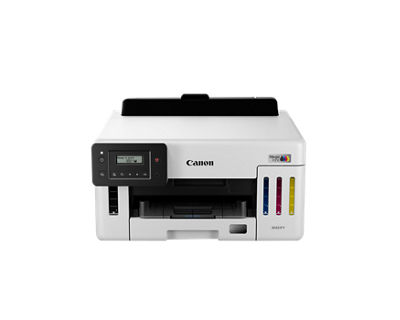
MAXIFY GX5110
- Wireless Printer
- Print up to 6,000 black & white / 14,000 color pages using a single set of inks!6
- Auto 2-Sided printing
- GX5110 Wireless MegaTank Small Office Printer
- Set of Ink Bottles (GI-16: BK, C, M, Y)
- Documentation
- Power Cord
Overview
Designed for home offices and small businesses, the MAXIFY GX5110 delivers high-quality, low-cost printing, and outstanding wireless connectivity in a compact size. Get serious print productivity with a high page yield of up to 6,000 Black & White / 14,000 Color pages per full ink bottle set and a combined 350-sheet plain paper capacity. Each printer comes with a full set of ink so you can print with confidence.
Features
Versatile Media Support
Print on envelopes, business cards, high resolution paper, banners, and more!

Sharp Text & Documents
Thanks to a 4 Color Pigment Ink System, you’ll get sharp and highlighter resistant text.
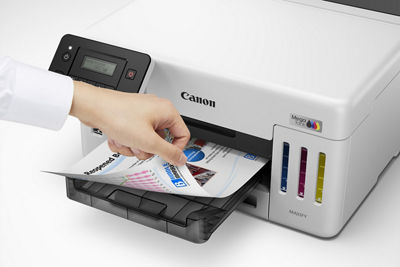
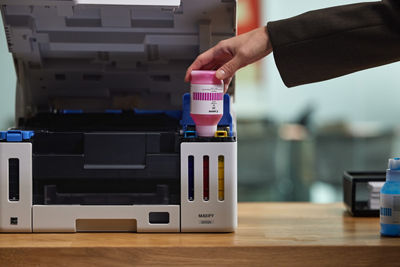
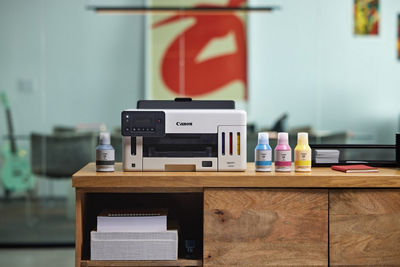
Easy to Fill
Ink bottles have a “keyed nozzle” design to only fit and fill the correct color ink tank.
2-Line LCD Screen
Get the job done easy with an intuitive and adjustable 2-line LCD screen.

Wireless Connect
Easy Wi-Fi® setup in minutes. Connect to Wi-Fi® without the need for a computer.7
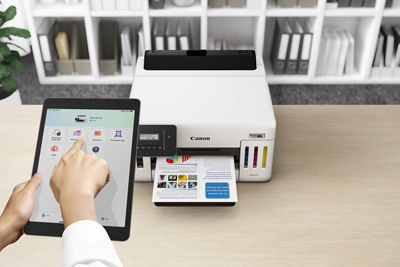
Mobile Device Printing
Print from your favorite mobile devices using the free Canon PRINT app1. Apple AirPrint®3, and Mopria Print Service®4.
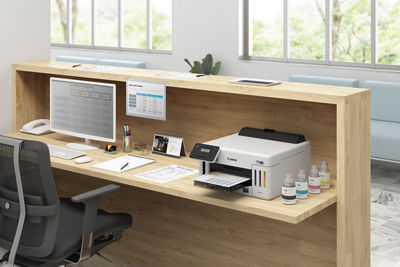
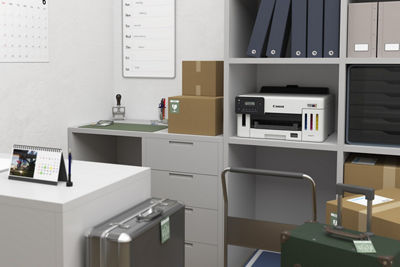
Space Saving Design
Not only are the GX Series printers packed with features, they’re also designed small to fit your workspace.
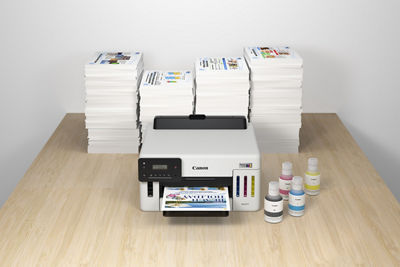
Built to Last
Get the job done during those busy months with a monthly duty cycle of up to 45,000 pages.5
250-Sheet Bottom Cassette
Load up to 250-Sheets of plain paper in the bottom cassette.
Specifications are subject to change without notice. All viewscreen and output images are simulated.
- Requires a smart device with the Canon PRINT app installed and connected to the desired active wireless network to complete cableless setup.
- Compatible with iPad and iPhone running iOS 16.0 or later, and Android mobile devices running Android 7.0 or later. Your device must be connected to the same working network with wireless 802.11 b/g/n/ac/a capability as your printer.
- AirPrint functionality requires a compatible iPad, iPhone, or iPod Touch device running iOS 7.0 or later, and an AirPrint-enabled printer connected to the same network as your iOS device. A printer connected to the USB port of your Mac, PC, AirPort Base station, or Time Capsule is not supported.
- Requires Android™ mobile device with Android 5.0 operating system or later with the Mopria Print Service pre-loaded with that device and the compatible printer on the same wireless network. The Mopria experience is also available on Android 4.4 or later mobile devices with a download of the Mopria Print Service from Google Play.
- Duty Cycle is defined as the maximum number of printed pages for a single peak month.
- Claim is based on page yield of 6,000 Black/14,000 Color pages per ink bottle set and for full set of GI-26 ink bottles (1 bottle each of Cyan, Magenta, Yellow, Black) as of March 2021. Page yield of color inks is an average yield of cyan, magenta and yellow inks combined. Page yield of included ink bottles used for initial setup is lower than the replacement ink bottles, as a certain amount of ink is consumed to fill into the print head during setup (charging the print head initially). Actual page yield and cost per print will vary significantly based on content printed, ink levels maintained in all four ink reservoirs, and other factors. Page yield is the estimated value based on Canon individual testing method using ISO/IEC 24712 test chart and continuous printing simulation with full set of replacement ink bottles after initial setup. Ink value savings and cost per print comparison with laser is based on total cost (using online manufacturers’ prices as of March 2021) of high yield and standard capacity (where high yield are not available) laser cartridges necessary to achieve equivalent page yields by similarly featured color laser printers.
- Wireless printing and scanning requires a working network with wireless 802.11b/g/n/a/ac capability, operating at 2.4GHz or 5.0GHz. Wireless performance may vary based on terrain and distance between the printer and wireless network clients.
- Document print speeds are the averages of ESAT in Office Category Test for the default simplex mode, ISO/IEC 24734. Photo print speed is based on the default setting using ISO/JIS-SCID N2 on Photo Paper Plus Glossy II and does not take into account data processing time on host computer. Print speed may vary depending on system configuration, interface, software, document complexity, print mode, page coverage, type of paper used etc. Copy speeds are the average of sFCOT and sESAT, ISO/IEC 29183. Copy speed may vary depending on document complexity, copy mode, page coverage, type of paper used etc. and does not take into account warming up time.
- Resolution may vary based on printer driver setting. Color ink droplets can be placed with a horizontal pitch of 1/4800 inch at minimum.
- Optical resolution is a measure of maximum hardware sampling resolution, based on ISO 14473 standard.
- Page count is based on ITU-T No.1 chart or Canon FAX Standard Chart No.1. The number of pages able to be kept in memory will vary based on remaining memory capacity and document complexity.
- Black & white document fax transmission speed is based on default setting using ITU-T No.1 chart. Color document fax transmission speed is based on default setting using Canon Color Fax Test Sheet. Actual transmission speed varies depending on document complexity, fax setting at receiving end, and line conditions etc.
- The Public Switched Telephone Network currently supports fax modem speeds of 28.8 Kbps or lower, depending on telephone line conditions. Sending and receiving fax machines need to conform to ITU-T v.34 guidelines.
- Operation can only be guaranteed on a PC with pre-installed Windows 11, Windows 10, Windows 10, Windows 8.1, Windows 7 SP1.
- Internet Connection required during software installation. For full compatibility macOS v11.7.6 or later is recommended.
- Some functions may not be available with these Operating Systems. Please refer to manual or Canon website for details.
- Requires an active smart assistant account linked and accompanying app enabled, the smart device and printer to be actively connected with permission to the Canon Inkjet Cloud Printing Center, and the required action(s), skill(s), or applet(s) available/enabled to the compatible printer. Voice commands can not be displayed as text on Amazon smart devices with screens.
- The Easy-PhotoPrint Editor software requires an Internet connection and is compatible with the following operating systems; Microsoft Windows 11 (64-bit), Microsoft Windows 10 (64-bit/32-bit), Microsoft Windows 8.1 (64-bit/32-bit), Microsoft Windows 7 (64-bit/32-bit), macOS 11.7.10 ~ macOS 14. Minimum Windows and macOS/Mac OS X require-ments are: 2GB of RAM and a monitor with 1024x768 resolution. The Easy-PhotoPrint Editor mobile application requires an Internet connection and the Easy-PhotoPrint Editor app v1.1.0, available for free on the App Store and at Google Play. Compatible with iPad Air2 (2nd Generation), iPad Mini 4 and iPhone 6s or later devices running iOS 11 or later, and Android mobile devices running Android 5.x or later. Certain exceptions may apply. The following file formats are supported: JPEG, PNG, HEIF (devices running iOS 11 and mac OS v10.13 or later), DLP save data, Poster Artist export data, EasyPhoto+ export data, Easy-PhotoPrint Editor export data.
- Requires an Internet connection and the Creative Park app, available for free on the App Store and at Google Play. Requires an active ‘Canon ID’ available for free, and subject to ‘Canon ID’ Terms of Service. Visit myid.canon for more information. Certain exceptions may apply.
- The online version of PosterArtist requires a personal computer with Internet access and a compatible Canon printer. The service is not available on some operating systems or browsers.
- Print quality might be lower depending on the operating environment.
| Printer Functions | |
| Print Features | Document Printing, Photo Printing, Wireless Printing7, Mobile Device Printing, Business Card Printing, Greeting Card Printing, Label Printing, Square Media Printing Support, Double-sided Matte Paper Support, Auto Duplex Printing |
| Printing Capability | Single Sided (Simplex/Duplex) Printing |
| Fast First Print Out (FPOT)8 | As fast as 8 Seconds (from Ready Mode/Simplex/Color) |
| Print Speed (ESAT)8 | Black Document Simplex: Approx. 24.0 ipm (Letter) Color Document Simplex: Approx. 15.5 ipm (Letter) |
| Print Resolution9 | Up to 1200 x 600 dpi |
| Number of Nozzles | Color (C/M/Y): 1,024x3 / Pigment Black: 1,280 / Total: 4,352 |
| Duty Cycle | Up to 45,000 Pages / Month |
| Media Handling | 1 Cassette: 250 Sheets 1 Rear Tray: 100 Sheets OR 20 Sheets 4” x 6” |
| Supported Paper / Media Sizes | 4” x 6”, 5” x 5” (Square), 5” x 7”, 7” x 10”, 8” x 10”, Letter (8.5” x 11”), Legal (8.5” x 14”), U.S. #10 Custom Size: Width: 3.5” - 8.5” / Length: 5” x 47” |
| Canon Paper / Media Compatibility |
|
| Supported Media Thickness / Weight | Rear Tray:
|
| Ink System & Information | 4-Color Pigment Continuous Ink Supply System (CISS), FINE Print Heads, Integrated Ink Tanks, ‘Squeeze-Free’ Ink Bottles For Easy & Mess Free Ink Filling, Unique Color Bottle Tip Shape for Correct Filling Every Time |
| Ink Type | GI-16 Pigment-Based Ink Bottles (Cyan, Magenta, Yellow, Black) |
| Ink Tank & Fill Volume |
|
| High Page Yield6 | Up to 6,000 (Black & White) / 14,000 (Color) Pages (Per Full Ink Bottle Set) |
| Connectivity Options |
|
| Wireless Information |
|
| OS Compatibility |
|
| Smart Assistant Support17 | Amazon Alexa™ |
| Mobile Printing Solutions & Apps (iOS®/ Android™) | AirPrint®3, Mopria® Print Service4, Canon PRINT app2, Easy PhotoPrint Editor App18, Canon Print Service(Android), PIXMA Cloud Link2, Creative Park App19 |
| Software (Windows14/Mac15) |
|
| General Features | Auto Power On/Off, Print/Scan/Copy, Quiet Mode, Wireless Direct Connection1, Wireless Connect1, Auto Paper Width Detection, User Replaceable Print Head, User Replaceable Maintenance Cartridge |
| Display | 2 Line Screen LCD |
| Supported Languages | 32 Supported Languages: Japanese, English (mm & inch), French, German, Italian, Spanish, Portuguese, Dutch, Danish, Norwegian, Swedish, Finnish, Greek, Polish, Czech, Russian, Hungarian, Slovene, Turkish, Simplified Chinese, Traditional Chinese, Korean, Indonesian, Slovakian, Estonian, Latvian, Lithuanian, Ukrainian, Romanian, Bulgarian, Croatian, Vietnamese |
| Power Information |
|
| Sound Management |
|
| Operating Environment21 |
|
Specifications are subject to change without notice. All viewscreen and output images are simulated.
- Requires a smart device with the Canon PRINT app installed and connected to the desired active wireless network to complete cableless setup.
- Compatible with iPad and iPhone running iOS 16.0 or later, and Android mobile devices running Android 7.0 or later. Your device must be connected to the same working network with wireless 802.11 b/g/n/ac/a capability as your printer.
- AirPrint functionality requires a compatible iPad, iPhone, or iPod Touch device running iOS 7.0 or later, and an AirPrint-enabled printer connected to the same network as your iOS device. A printer connected to the USB port of your Mac, PC, AirPort Base station, or Time Capsule is not supported.
- Requires Android™ mobile device with Android 5.0 operating system or later with the Mopria Print Service pre-loaded with that device and the compatible printer on the same wireless network. The Mopria experience is also available on Android 4.4 or later mobile devices with a download of the Mopria Print Service from Google Play.
- Duty Cycle is defined as the maximum number of printed pages for a single peak month.
- Claim is based on page yield of 6,000 Black/14,000 Color pages per ink bottle set and for full set of GI-26 ink bottles (1 bottle each of Cyan, Magenta, Yellow, Black) as of March 2021. Page yield of color inks is an average yield of cyan, magenta and yellow inks combined. Page yield of included ink bottles used for initial setup is lower than the replacement ink bottles, as a certain amount of ink is consumed to fill into the print head during setup (charging the print head initially). Actual page yield and cost per print will vary significantly based on content printed, ink levels maintained in all four ink reservoirs, and other factors. Page yield is the estimated value based on Canon individual testing method using ISO/IEC 24712 test chart and continuous printing simulation with full set of replacement ink bottles after initial setup. Ink value savings and cost per print comparison with laser is based on total cost (using online manufacturers’ prices as of March 2021) of high yield and standard capacity (where high yield are not available) laser cartridges necessary to achieve equivalent page yields by similarly featured color laser printers.
- Wireless printing and scanning requires a working network with wireless 802.11b/g/n/a/ac capability, operating at 2.4GHz or 5.0GHz. Wireless performance may vary based on terrain and distance between the printer and wireless network clients.
- Document print speeds are the averages of ESAT in Office Category Test for the default simplex mode, ISO/IEC 24734. Photo print speed is based on the default setting using ISO/JIS-SCID N2 on Photo Paper Plus Glossy II and does not take into account data processing time on host computer. Print speed may vary depending on system configuration, interface, software, document complexity, print mode, page coverage, type of paper used etc. Copy speeds are the average of sFCOT and sESAT, ISO/IEC 29183. Copy speed may vary depending on document complexity, copy mode, page coverage, type of paper used etc. and does not take into account warming up time.
- Resolution may vary based on printer driver setting. Color ink droplets can be placed with a horizontal pitch of 1/4800 inch at minimum.
- Optical resolution is a measure of maximum hardware sampling resolution, based on ISO 14473 standard.
- Page count is based on ITU-T No.1 chart or Canon FAX Standard Chart No.1. The number of pages able to be kept in memory will vary based on remaining memory capacity and document complexity.
- Black & white document fax transmission speed is based on default setting using ITU-T No.1 chart. Color document fax transmission speed is based on default setting using Canon Color Fax Test Sheet. Actual transmission speed varies depending on document complexity, fax setting at receiving end, and line conditions etc.
- The Public Switched Telephone Network currently supports fax modem speeds of 28.8 Kbps or lower, depending on telephone line conditions. Sending and receiving fax machines need to conform to ITU-T v.34 guidelines.
- Operation can only be guaranteed on a PC with pre-installed Windows 11, Windows 10, Windows 10, Windows 8.1, Windows 7 SP1.
- Internet Connection required during software installation. For full compatibility macOS v11.7.6 or later is recommended.
- Some functions may not be available with these Operating Systems. Please refer to manual or Canon website for details.
- Requires an active smart assistant account linked and accompanying app enabled, the smart device and printer to be actively connected with permission to the Canon Inkjet Cloud Printing Center, and the required action(s), skill(s), or applet(s) available/enabled to the compatible printer. Voice commands can not be displayed as text on Amazon smart devices with screens.
- The Easy-PhotoPrint Editor software requires an Internet connection and is compatible with the following operating systems; Microsoft Windows 11 (64-bit), Microsoft Windows 10 (64-bit/32-bit), Microsoft Windows 8.1 (64-bit/32-bit), Microsoft Windows 7 (64-bit/32-bit), macOS 11.7.10 ~ macOS 14. Minimum Windows and macOS/Mac OS X require-ments are: 2GB of RAM and a monitor with 1024x768 resolution. The Easy-PhotoPrint Editor mobile application requires an Internet connection and the Easy-PhotoPrint Editor app v1.1.0, available for free on the App Store and at Google Play. Compatible with iPad Air2 (2nd Generation), iPad Mini 4 and iPhone 6s or later devices running iOS 11 or later, and Android mobile devices running Android 5.x or later. Certain exceptions may apply. The following file formats are supported: JPEG, PNG, HEIF (devices running iOS 11 and mac OS v10.13 or later), DLP save data, Poster Artist export data, EasyPhoto+ export data, Easy-PhotoPrint Editor export data.
- Requires an Internet connection and the Creative Park app, available for free on the App Store and at Google Play. Requires an active ‘Canon ID’ available for free, and subject to ‘Canon ID’ Terms of Service. Visit myid.canon for more information. Certain exceptions may apply.
- The online version of PosterArtist requires a personal computer with Internet access and a compatible Canon printer. The service is not available on some operating systems or browsers.
- Print quality might be lower depending on the operating environment.

- Windows Server 2025
- macOS 15
- macOS 14
- macOS 13
- Windows 11
- macOS 12
- Windows Server 2022
- macOS 11
- Linux MIPS
- Linux ARM
- macOS 11.0
- macOS 10.15
- macOS v10.13
- macOS v10.14
- Windows Server 2019 (x64)
- macOS v10.14
- macOS v10.13
- Windows Server 2016 (x64)
- macOS v10.12
- Linux 64bit
- Linux 32bit
- OS X v10.11
- Windows 10
- Windows 10 (x64)
- OS X v10.10
- Windows Server 2012 R2 (x64)
- OS X v10.9
- Windows 8.1 (x64)
- Windows 8.1
- Windows Server 2012 (x64)
- Windows 8
- Windows 8 (x64)
- Windows 7
- Windows 7 (x64)
- Windows Vista
- Windows Vista (x64)
- Windows XP
- Windows XP (x64)
- Windows Server 2008
- Windows Server 2008 (x64)
- Windows Server 2008 R2 (x64)
- Windows Server 2003
- Windows Server 2003 (x64)
- Windows Server 2003 R2
- Windows Server 2003 R2 (x64)
- Windows 2000
- Windows NT
- Windows 3.1
- Windows Me
- Windows 98
- Windows 95
- Mac OS X v10.8
- Mac OS X v10.7
- Mac OS X v10.6
- Mac OS X v10.5
- Mac OS X v10.4
- Mac OS X v10.3
- Mac OS X v10.2
- Mac OS X v10.1
- Mac OS X
- Mac OS 9
- Mac OS 8
- Linux (x64)
- Linux (x32)
- Linux
- Not Applicable