Explore null | Canon Latin America
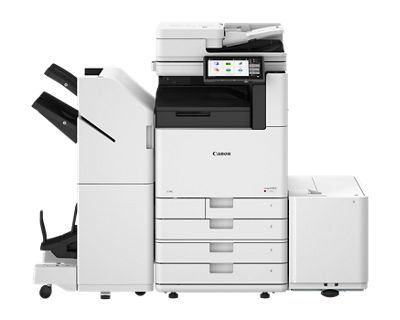
imageFORCE C3150
- Color A3 Multifunction Printer
- Prints up to 50 ppm (BW/Color, Letter)
- Scans up to 270 ipm (Up to 300 dpi BW/Color Duplex)
- Up to 4800 x 2400 dpi Print Resolution
Overview
Built for today’s busy mid-volume print environments, the imageFORCE C3150 delivers tactical performance with a reliable design. Engineered for everyday productivity, it is designed to provide outstanding image quality and enhanced efficiency within a compact design.

Features
Print Better
Achieve stunning, high-resolution prints with advanced precision, vibrant color quality, and Canon’s professional-grade reliability.
Brilliant 4800 dpi
Canon’s unique D² Exposure technology is designed to achieve 4800 x 2400 dpi resolution.
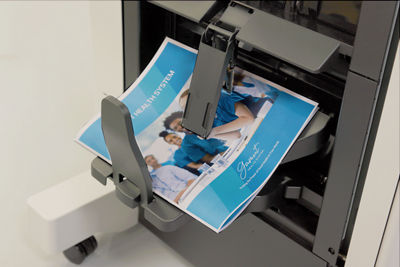
Outstanding Precision
Helps minimize color shift and provides consistent color registration.

Do More
Help elevate daily efficiency with seamless workflows, simple and intuitive print technology, integrated solutions, and flexible media handling.

Simple User Interface
Each model within the imageFORCE line-up supports a consistent user interface, enabling operators to effortlessly run the device with a minimal learning curve.
- Large 10.1” responsive and intuitive touch screen.
- Familiar interface with icons that are categorized by color.
- Easy customization settings for language, accessibility, and display preferences.
Cloud Ready Solutions
Canon’s imageFORCE systems have the ability to integrate seamlessly with a range of powerful Canon and third-party software to help your workflow evolve. For example, you can easily print and scan to—and from—your favorite cloud storage services with the optional Cloud Connector.Footnote1

Hassle-Free Setup and Maintenance
Canon U.S.A.’s range of Smart Services are available as an option and are designed to help support you at every stage of the device management life cycle. Benefits include:
- Setting up and deploying your devices quickly.
- Enabling proactive service and fast issue resolution.
- Access upgrades and replace parts with ease.

Gain Control of Your Fleet
Centralize the management of your compatible print fleet and help maximize uptime with the support of imageWARE Enterprise Management Console. A standard feature on Canon devices, this console helps to monitor device status and consumables, apply security settings, update firmware, capture meter readings, and much more—anytime and anywhere.

Printing that Performs. Scanning that Delivers.
Performance doesn’t need to stop at print. This highly capable color multifunction device is built to help boost your productivity—empowering your workforce to handle everyday tasks with speed, accuracy, and smart document handling, from start to finish.
Built with a Sustainability Features
From product design to power use, Canon’s commitment to the environment can be seen with the imageFORCE series of printers. Features include:
Stay Ahead
Make the move forward with cutting-edge print technology that is built to help your organization be more productive and more prepared for the unexpected.

Recommends security settings based on the device’s operating environment.
A U.S. government standard for cryptographic modules, supporting data encryption and security in hardware and software systems.


Provides flexible authentication methods for PIN, username/password, or badge authentication accessibility, and display preferences.
- Term license required.
- This feature is off by default and must be turned on by the user. Warm up times are affected once turned on.
- Third-party SIEM system required. Subject to third-party SIEM system terms and conditions. Canon cannot ensure compatibility with all third-party SIEM systems.
- Time from device power-on to when the copy icon appears and is enabled to operate on the touch panel display.
- Time from exiting Sleep Mode to when printing is operational.
- Time from device power-on until copy ready (not print reservation).
- Envelope Feeder Attachment Kit B is required.
- Envelope Feeder Attachment Kit A (standard) is required.
- Long Sheet Feeding Tray-A1 is required and Staple Finisher-AH1 or Booklet Finisher-AH1 is required.
- Standard (including 1-Pass DADF).
- Includes consumables.
| Technology/Type | OLED/A3 Color Multifunction |
| Core Functions |
|
| Print/Copy Speed (BW and Color) |
|
| Scan Speed (ipm: Black-and-white/Color) |
|
| Memory | 5.0 GB RAM |
| Solid-State Drive |
|
| Warm-up Time | |
| Paper Capacity (Letter, 20 lb. Bond) |
|
| Supported Media Types |
|
| Supported Media Sizes | Upper Cassette
|
| Supported Media Weights |
|
| Dimensions (W x D x H)Footnote10 | 22-1/4” x 29-3/8” x 35-3/8” (565 x 745 x 897 mm) |
| Weight | Approx. 200.6 lb. (91 kg)Footnote11 |
- Term license required.
- This feature is off by default and must be turned on by the user. Warm up times are affected once turned on.
- Third-party SIEM system required. Subject to third-party SIEM system terms and conditions. Canon cannot ensure compatibility with all third-party SIEM systems.
- Time from device power-on to when the copy icon appears and is enabled to operate on the touch panel display.
- Time from exiting Sleep Mode to when printing is operational.
- Time from device power-on until copy ready (not print reservation).
- Envelope Feeder Attachment Kit B is required.
- Envelope Feeder Attachment Kit A (standard) is required.
- Long Sheet Feeding Tray-A1 is required and Staple Finisher-AH1 or Booklet Finisher-AH1 is required.
- Standard (including 1-Pass DADF).
- Includes consumables.
