Explore null | Canon Latin America
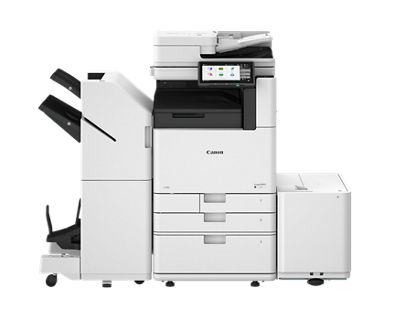
imageFORCE 4100 Series
- Black-and-White A3 Multifunction Printer
- Prints up to 45 ppm (BW, Letter)
- Scans up to 270 ipm (300 dpi BW/Color Duplex)
- Up to 4800 x 2400 dpi Print Resolution
Overview
The imageFORCE 4100 series supports low- to mid-volume enterprise environments, helping teams keep up with everyday workflows while delivering sharp black-and-white output with precise print quality. Utilizing rapid scanning and intelligent workflow integration, this is an optimal solution for users who depend on performance, accuracy, and reliability to stay productive.

Features
Print Better
Achieve stunning, high-resolution prints with advanced precision, crisp black-and-white quality, and Canon’s professional-grade reliability.
Brilliant 4800 dpi
Canon’s unique D² Exposure technology is designed to achieve 4800 x 2400 dpi resolution.
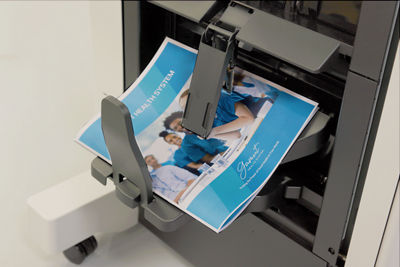
Outstanding Precision
Imaging technologies that deliver sharp and uniform images with deep black-and-white tones.

Do More
Help elevate daily efficiency with seamless workflows, simple and intuitive print technology, integrated solutions, and flexible media handling.

Simple User Interface
Each model within the imageFORCE line-up supports a consistent user interface, enabling operators to effortlessly run the device with a minimal learning curve.
- Large 10.1” responsive and intuitive touchscreen.
- Familiar interface with icons categorized by color.
- Easy customization settings for language, accessibility, and display preferences.
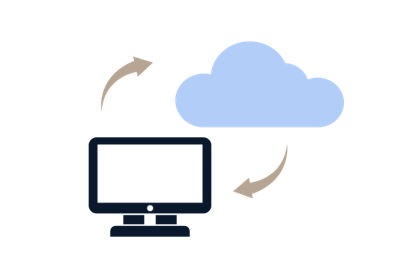
Cloud Ready Solutions
Canon’s imageFORCE systems have the ability to integrate seamlessly with a range of powerful Canon and third-party software to help your workflow evolve. For example, you can easily print and scan to—and from—your favorite cloud storage services with Cloud Connector.Footnote1

Hassle-Free Setup and Maintenance
Canon U.S.A.’s range of Smart Services is designed to help support you at every stage of the device management life cycle. Benefits include:
- Setting up and deploying your devices quickly.
- Enabling proactive service and fast issue resolution.
- Access upgrades and replace parts with ease.

Gain Control of Your Fleet
Centralize the management of your print fleet and help maximize uptime with the support of imageWARE Enterprise Management Console. imageWARE Enterprise Management Console helps to monitor device status and consumables, apply security settings, update firmware, capture meter readings, and much more— virtually anytime and anywhere.

Printing that Performs. Scanning that Delivers.
Performance doesn’t need to stop at print. Scan speeds of up to 270 images per minute with the Single Pass DADF-E1 option. Scan full-color documents quickly and accurately at single-pass duplex scan speeds. Whether you’re digitizing reports, ID cards, or mixed media files, you can capture clean, high-resolution scans that integrate seamlessly into your digital workflows.
Built with a Focus on Sustainability
From product design to power use, Canon’s commitment to the environment takes center stage with the imageFORCE series of printers. Features include:
Stay Ahead
Make the move forward with cutting-edge print technology that is built to help your organization be more productive, and more prepared for the unexpected.

Recommends security settings based on the device’s operating environment.

A U.S. government standard for cryptographic modules, supporting data encryption and security in hardware and software systems.



Provides flexible authentication methods for PIN, username/password, or badge authentication accessibility, and display preferences.
- Term license required.
- This feature is off by default and must be turned on by the user. Warm up times are affected once turned on.
- Third-party SIEM system required. Subject to third-party SIEM system terms and conditions. Canon cannot ensure compatibility with all third-party SIEM systems.
- When paper is fed from Upper Cassette, High-Capacity Cassette, Feeding Unit-F1, or Paper Deck Unit-F3.
- Time from device power-on to when the copy icon appears and is enabled to operate on the touch panel display.
- Time from device power-on, until copy ready (not print reservation).
- Envelope Feeder Attachment B (standard) is required except ISO-C5.
- Envelope Feeder Attachment A (standard) is required.
- Long Sheet Feeding Tray-A1 is required and Staple Finisher-AH1 or Booklet Finisher-AH1 is required.
- Standard (including 1-Pass DADF).
- Including the optional 1st Copy Tray Kit-C1 and regular toner.
| Technology/Type | OLED/A3 Monochrome Multifunction |
| Core Functions |
|
| Print/Copy Speed (BW) | imageFORCE 4145:
imageFORCE 4135:
imageFORCE 4125:
|
| Scan Speed (ipm, BW/CL, Letter) | Single Pass DADF-E1
Single Pass DADF-F1
|
| Memory | 5.0 GB RAM |
| Solid-State Drive |
|
| Warm-up Time | |
| Paper Capacity (Letter, 20 lb. Bond) |
|
| Supported Media Types |
|
| Supported Media Sizes | Upper Cassette
|
| Supported Media Weights |
|
| Dimensions (W x D x H)Footnote10 |
|
| Weight |
|
- Term license required.
- This feature is off by default and must be turned on by the user. Warm up times are affected once turned on.
- Third-party SIEM system required. Subject to third-party SIEM system terms and conditions. Canon cannot ensure compatibility with all third-party SIEM systems.
- When paper is fed from Upper Cassette, High-Capacity Cassette, Feeding Unit-F1, or Paper Deck Unit-F3.
- Time from device power-on to when the copy icon appears and is enabled to operate on the touch panel display.
- Time from device power-on, until copy ready (not print reservation).
- Envelope Feeder Attachment B (standard) is required except ISO-C5.
- Envelope Feeder Attachment A (standard) is required.
- Long Sheet Feeding Tray-A1 is required and Staple Finisher-AH1 or Booklet Finisher-AH1 is required.
- Standard (including 1-Pass DADF).
- Including the optional 1st Copy Tray Kit-C1 and regular toner.
