Explore null | Canon Latin America
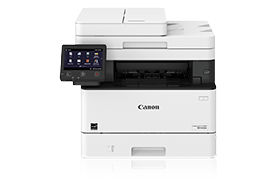
imageCLASS MF449dw
- Print up to 40 ppm
- Print up to 8-1/2" x 14"
- 900-sheet maximum paper capacity
- Supports uniFLOW and uniFLOW Online
- MF449dw Product
- Canon Genuine Toner 057, Standard Yield (3,100 Pages)
- Power Cord
- Fax Cord
- User Software DVD
- Getting Started Guide
- Warranty Card
Designed for small workgroups within an enterprise environment, the Canon imageCLASS MF449dw balances speedy performance, minimal maintenance, and the ability to add an extra paper tray for busy groups. A 5" color touchscreen delivers an intuitive user experience and can be customized by a device administrator to help simplify many daily tasks.
The imageCLASS MF449dw is registered EPEAT Silver.

The imageCLASS MF449dw is registered EPEAT Silver.

Workflow Efficiency
- 5" intuitive color touchscreen with smartphone-like usability.
- A unique, customized device experience with Application Library.
- Supports mobile solutions for printing and scanning.1
- Scan and convert documents to searchable digital files through a single-pass duplex document feeder.
- Designed for smaller print jobs with first-print time as fast as 5.3 seconds.
Security
- Low risk of confidential information loss as documents are only stored in short-term memory.
- With imageWARE Enterprise Management Console Device Configuration Manager Plug-in, security settings can be captured and exported to other devices on the same network.2
- Remotely control device access and set rules via optional uniFLOW or uniFLOW Online.
- Limit document distribution by implementing Send-to-Myself-only.
- Verify System at Startup is a process to help verify the validity of the device firmware, and Application Library from unauthorized modifications.
Cost Management
- Leverage optional uniFLOW or uniFLOW Online for full accounting and reporting for Canon and third-party devices, pull printing, and job routing.
- Service parts are designed for machine's life cycle to help minimize need for proactive maintenance and potentially reduce service calls.
- High-capacity, all-in-one cartridge helps reduce overall supply costs.
Device and Fleet Management
- Designed for quick, easy deployment.
- Remote diagnostics for rapid service response.
- Easily monitor device status and consumable levels, observe meter readings, manage settings, and implement security settings.
Quality and Reliability
- Canon's signature reliability and engine technologies keep productivity high and minimize the impact on support resources.
- Designed to achieve maximum uptime with status notifications to help keep supplies replenished.
- Intuitive maintenance videos for common tasks like consumables replacement.
Sustainability
- A combination of fusing technologies and low-melting-point toner minimizes power requirements and helps achieve low-energy consumption.
- Encourage environmentally conscious work practices by providing settings that can help save paper and energy.
- ENERGY STAR® certified and currently rated EPEAT® Silver.3
Manage Output with uniFLOW
The optional uniFLOW portfolio offers an on-premise or cloud solution that imageCLASS devices can utilize with flexible authentication. With either card-based or PIN code-based authentication, imageCLASS devices can secure output management, track costs with reporting, and operate mobile printing.
Fleet Management Tools
imageWARE Enterprise Management Console can be used by a device administrator to centrally manage the Canon printer fleet, including consumables, status notifications, meters, and configuration settings. imageWARE Remote allows for the service provider to manage devices proactively, including remote diagnosis and reporting. Local Content Delivery System facilitates remote firmware download at the device level.
Fast, Single-Pass Duplex Scanning
The imageCLASS MF449dw leverages a single-pass document feeder for two-sided scanning at up to 70 images per minute (ipm) in black and white or 26 ipm in color. Scanned files can be converted into multiple file formats, including Hi-Compression PDF and Searchable PDF (OCR).
Easy to Use with Application Library
Unique to the Canon product line, the Application Library platform allows for one-touch button creation of key functions: Print Template, Standby Slide (screen saver), Scan-to-Preset Destination, ID Card Copy, Consumables Information, Copy (Eco), Copy (Bleed Reduce), Passport Copy, Fax and Store, Name and Scan, Copy (Enhance Text), and Language.
- Canon PRINT Business is a free app available on the App Store® and Google Play™ Store. For more information, including compatibility, please visit https://www.cla.canon.com/cla/en/office/MobileApps. Please see the respective websites for Apple AirPrint and Mopria Print Service for compatibility and additional information.
- Please reference user manuals for details on settings available to export.
- For latest EPEAT ratings (Gold/Silver/Bronze), please visit https://www.cla.canon.com/cla/en/epeat.
- Includes consumables.
- Print speed is based on internal testing. Print speed may vary, depending on the number of copies selected as well as the settings for size, type, and orientation of paper.
| Printer Type | Black And White Laser |
| Print Speed | Up To 40 Ppm (Letter); Up To 32 Ppm (Legal) 5 |
| First Print Time | Approx. 5.3 Seconds |
| Printer Language | UFR II, PCL®6, PCLL®5, Adobe PostScript 3L® |
| Print Resolution | 600 X 600 (Dpi) |
| Duplex Print | Automatic (Standard) |
| Print Memory | 1GB |
| Direct Print From Usb | Available From USB Memory (JPEG, TIFF, PDF) |
| Copy Speed | Up To 40 Ppm (Letter); Up To 32 Ppm (Legal) |
| Copy Resolution | 600 X 600 (Dpi) |
| First Copy Time | Approx. 6.2 Seconds |
| Maximum Number Of Copies | Up To 999 Copies |
| Reduction Enlargement | Preset Reductions: 25%, 50%, 64%, 78% Preset Enlargements: 129%, 200%, 400% |
| Copy Size | Platen: Up To Letter ADF: Up To Legal |
| Copy Features | Paper Setting, Favorite Settings, Two-Sided, Original Type Selection, Cancel, N-On-1, Density Adjustment, Sharpness, Erase Frame, Collate, Copy ID Card |
| Modem Speed | Super G3: 33.6 Kbps G3: 14.4 Kbps |
| Fax Resolution | 400 X 400, 200 X 400, 200 X 200, 200 X 100 |
| Memory Capacity | Up To 512 Pages |
| Speed Dials | Max. 281 |
| Group Dialing | Max. 299 Dials |
| Sequential Broadcasting | Max. 310 Addresses |
| Fax Features | RX Mode, Resolution, Two-Sided Original, Density, Sharpness, Favorite Settings, Duplex Fax |
| Memory Backup | Yes |
| Scan Type | Single-Pass Duplexing Automatic Document Feeder |
| Scan Resolution | 300 X 600, 600 X 600 |
| Scan Size | Legal, Letter, Statement |
| Duplex Scan | Yes |
| Output File Formats | Standard: TIFF, JPEG, PDF (Compact, Searchable) Optional: PDF (Encrypted, Digital Signature) |
| Pull Scan | ScanGear MF For TWAIN, WIA, And ICA |
| Standard Paper Source | 250-Sheet Paper Cassette, 100-Sheet Multipurpose Tray |
| Optional Paper Source | 550-Sheet Paper Cassettes (Cassette Unit-AH1) |
| Paper Output | Standard: 65 Sheets |
| Paper Weight | Cassettes: 16 Lb. Bond To 32 Lb. Bond (60 To 120 G/M2) Multipurpose Tray: 16 Lb. Bond To 43 Lb. Bond (60 To 163 G/M2) |
| Media Sizes | Cassettes: Letter, Legal, Statement, Executive Custom (Min. 4.1" X 5.8" To Max. 8.5" X 14") Multipurpose Tray: Letter, Legal, Statement, Executive Envelope: COM10, Monarch, C5, DL Custom (Min. 3" X 5" To Max. 8.5" X 14") |
| Media Types | Cassettes: Thin, Plain, Recycled, Thick, Bond Multipurpose Tray: Thin, Plain, Recycled, Thick, Bond, Label, Envelope (10 Envelopes) |
| Standard Interface | USB 2.0 X2 (Host), USB 2.0 X1 (Device) High-Speed, 10/100/1000Base-T Ethernet (Network), Wi-Fi 802.11b/G/N, Wi-Fi® Direct Connection |
| Wifi Authentication Methods | WEP 64/128 Bit, WPA-PSK (TKIP/AES), WPA2-PSK (AES) |
| Mobile Functions | Apple® AirPrint,® Canon PRINT Business, Mopria™ Print Service, Google Cloud Print,™ UniFLOW Secure Mobile Printing |
| Network Management Protocols | IP/MAC Address Filtering, IPSEC, TLS Encrypted Communication, SNMP V3.0, IEEE 802.1X, IPv6, SMTP Authentication, POP Authentication Before SMTP |
| Os Compatibility | UFR II/PCL/PS: Windows® 7/Windows 8.1/Windows 10/Windows Server 2008/Windows Server 2008 R2/ Windows Server 2012/Windows Server 2012 R2/Windows Server 2016/Mac OS X V10.8.5 (Or Later) |
| Power Consumption | Maximum: Approx. 1330 W Standby: Approx. 10 W Sleep Mode: Approx. 0.9 W |
| Typical Energy Consumption | 0.34 KWh |
| Dimensions | Standard (Desktop): 17.9" X 18.3" X 15.5" (453 Mm X 464 Mm X 392 Mm) |
| Unit Weight Without With Cartridge | Approx. 35.8 Lb. (16.2 Kg) |
| Package Weight | Approx. 45.9 Lb. (20.8 Kg) 4 |
| Lcd Display | 5" Color Touch-Panel |
- Canon PRINT Business is a free app available on the App Store® and Google Play™ Store. For more information, including compatibility, please visit https://www.cla.canon.com/cla/en/office/MobileApps. Please see the respective websites for Apple AirPrint and Mopria Print Service for compatibility and additional information.
- Please reference user manuals for details on settings available to export.
- For latest EPEAT ratings (Gold/Silver/Bronze), please visit https://www.cla.canon.com/cla/en/epeat.
- Includes consumables.
- Print speed is based on internal testing. Print speed may vary, depending on the number of copies selected as well as the settings for size, type, and orientation of paper.

Filter & Sort
Filtrar y ordenar
Filtrar e ordenar
Download Type
Tipo de descarga
Tipo de download
2. Select the Version
- Windows Server 2025
- macOS 15
- macOS 14
- macOS 13
- Windows 11
- macOS 12
- Windows Server 2022
- macOS 11
- Linux MIPS
- Linux ARM
- macOS 11.0
- macOS 10.15
- macOS v10.13
- macOS v10.14
- Windows Server 2019 (x64)
- macOS v10.14
- macOS v10.13
- Windows Server 2016 (x64)
- macOS v10.12
- Linux 64bit
- Linux 32bit
- OS X v10.11
- Windows 10
- Windows 10 (x64)
- OS X v10.10
- Windows Server 2012 R2 (x64)
- OS X v10.9
- Windows 8.1 (x64)
- Windows 8.1
- Windows Server 2012 (x64)
- Windows 8
- Windows 8 (x64)
- Windows 7
- Windows 7 (x64)
- Windows Vista
- Windows Vista (x64)
- Windows XP
- Windows XP (x64)
- Windows Server 2008
- Windows Server 2008 (x64)
- Windows Server 2008 R2 (x64)
- Windows Server 2003
- Windows Server 2003 (x64)
- Windows Server 2003 R2
- Windows Server 2003 R2 (x64)
- Windows 2000
- Windows NT
- Windows 3.1
- Windows Me
- Windows 98
- Windows 95
- Mac OS X v10.8
- Mac OS X v10.7
- Mac OS X v10.6
- Mac OS X v10.5
- Mac OS X v10.4
- Mac OS X v10.3
- Mac OS X v10.2
- Mac OS X v10.1
- Mac OS X
- Mac OS 9
- Mac OS 8
- Linux (x64)
- Linux (x32)
- Linux
- Not Applicable
3. Software and Drivers Results
Results will appear after selecting an Operating System and Version above.